- Pros & Cons of Bitkey Wallet
- First Impressions & Unboxing
- Initial Setup & User Experience
- Bitkey Wallet Security Features
- Supported Cryptocurrencies & Tokens
- Connectivity & Compatibility
- Bitkey Wallet Advanced Features
- Pricing & Value for Money
- Bitkey Hardware Wallet - Compared
- Who is Bitkey Best Suited For?
- Conclusion & Final Verdict
- FAQs (Frequently Asked Questions)
Bitkey Review 2026

- When you click links on this page, we may earn an affiliate commission. By using this website you agree to our terms and conditions and privacy policy.
- Participation in online gambling may be illegal in your country and is subject to age restrictions (18, 19, or 21, depending on the jurisdiction). Verify legality and age requirements before participating. Learn more
Hardware wallets are specialized devices that provide physical protection for your crypto wallet. They utilize on-board security chips and anti-tamper mechanisms to prevent modification. While hardware wallets offer unparalleled protection, they can cost between $50 and $300, so they're not for everyone.
Bitkey is an innovative mobile-only hardware wallet created by Block (founded by Jack Dorsey). Designed exclusively for Bitcoin, Bitkey wallets are not suitable for people with diverse portfolios. However, they excel at making Bitcoin security more convenient, thanks to features like NFC connectivity and a built-in fingerprint scanner.
Throughout this Bitkey review, we'll take an in-depth look at security, ease of use, pricing/value, and overall versatility to help our readers make an informed decision on whether it's right for them. We will also highlight some popular alternatives and showcase how they stack up against Bitkey. Let's get started.
Key Takeaways
- Bitkey wallets are a 2-of-3 multisig wallet and can only store Bitcoin. They do not support the Lightning Network or dApps.
- Bitkey's price varies significantly depending on location. It's more than double the price in the UK compared to the USA.
- Bitkey wallets lack a display and use NFC, so they're managed entirely via mobile device. Desktop computers and laptops are unsupported.
- If you're a USA-based Bitcoin investor, then Bitkey wallets are a solid choice. However, international investors or those with diverse portfolios may prefer an alternative.
Pros & Cons of Bitkey Wallet
Pros
- The fingerprint scanner makes unlocking the device convenient.
- The 2-of-3 multi-sig setup makes recovery straightforward.
- Using mobile devices for wallet management removes the difficulties associated with small hardware wallet displays.
- Open-source with code publicly available on Bitkey's GitHub repository.
- Cool design with a unique finish and steel backing for a premium feel.
Cons
- Only compatible with Bitcoin.
- Regional pricing disparities.
- A bit overpriced for the features it offers
First Impressions & Unboxing
The unboxing experience can reveal a lot about a hardware wallet. Typically, devices with well-thought-out packaging and anti-tamper systems have been built with greater care and provide superior security. Although it puts greater emphasis on function over form, my first impressions of Bitkey were positive.
Packaging
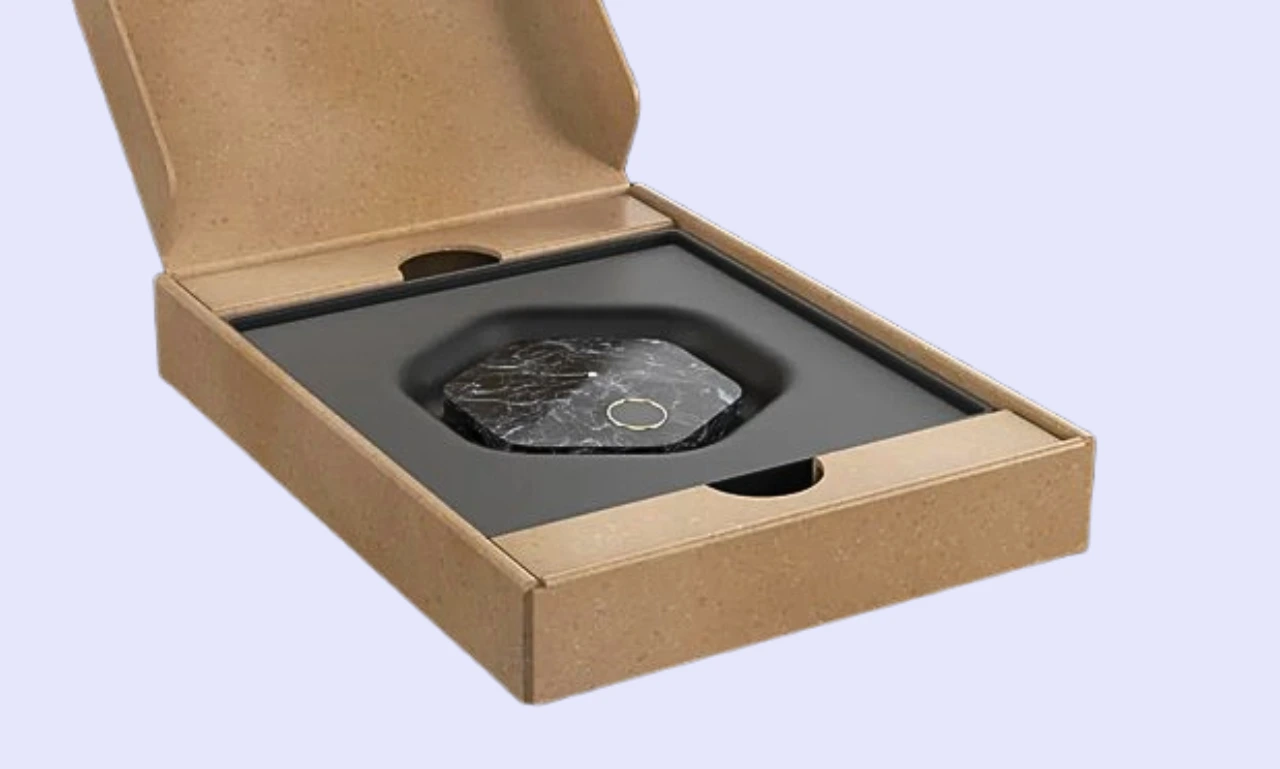
Bitkey devices are sent in unbranded cardboard boxes within plain shipping bags to help combat supply-chain attacks in which bad actors intercept a hardware wallet during shipping.
Upon opening the shipping box, the Bitkey wallet and getting-started guide are immediately accessible, while the charging cable is hidden beneath the device. The unboxing experience was straightforward, but it didn't feel like a premium device, which is unfortunate given how expensive Bitkey is in select regions.
I was disappointed to find that Bitkey features no real anti-tamper protection. Users can see if someone has opened the box, but it doesn't feature a branded plastic seal or holographic tamper-evident stickers. Bitkey's microcontroller checks authenticity instead. Moreover, Bitkey never sells refurbished or returned units; they're retired indefinitely.
Considering that most other popular hardware wallet manufacturers, such as Ledger, Trezor, and BitBox, offer tamper-evident packaging (some devices are even priced lower), it's disappointing that Bitkey has omitted this key detail. However, users shouldn't have an issue returning clearly damaged or modified devices to Bitkey for a replacement.
What's in the box?
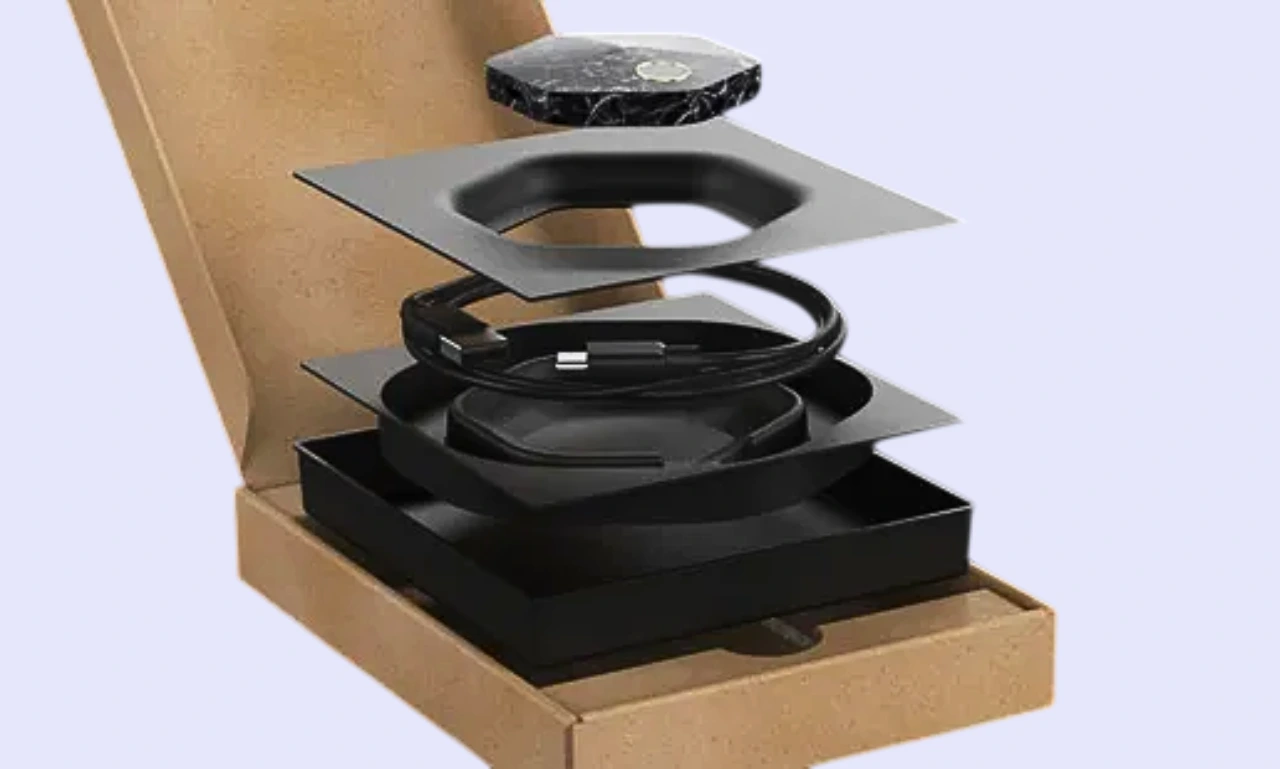
It's common for hardware wallets, like the Trezor Safe 5, to include a few recovery sheets for backing up seed phrases and a handful of branded accessories, such as stickers or lanyards. However, Bitkey has taken a no-frills approach, including only the essentials:
- 1x Bitkey hardware wallet
- 1x USB-C to USB-A charging cable
- 1x Getting started guide
The lack of accessories harms the unboxing experience, not usability. While not including recovery sheets seems like an oversight, it's intentional. Bitkey wallets do not use a seed phrase; they utilize a 2-of-3 multi-signature setup that splits keys between the hardware wallet, the Bitkey mobile app, and Bitkey's servers.
Build Quality
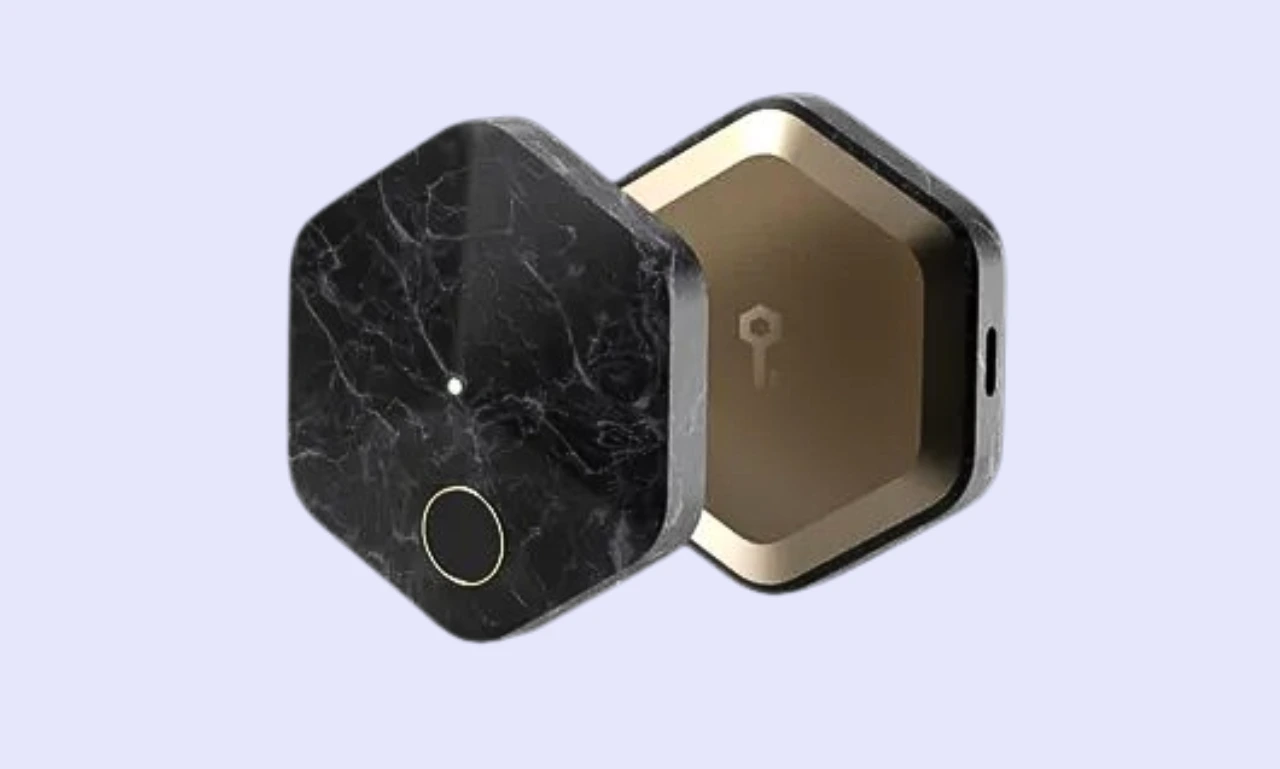
Bitkey hardware wallets are unique in their design. While most alternatives are rectangular and built to be as small as possible, Bitkey wallets are hexagonal and relatively large (56mm x 62mm x 13mm, 65 grams), given that they don't feature a display for users to read.
The device features a Corian® Solid Surface top, which is highly durable and lightweight. Bitkey has opted for a stainless steel backing, which results in a premium-feeling construction. Bitkey wraps every wallet in a unique black-and-white pattern, which gives the devices an interesting finish.
I found that the device offers a premium feel during my Bitkey review. While it looks slightly odd compared to other hardware wallets, its sleek design makes Bitkey feel at home on a desk or in an office. If you're looking for a durable and unique Bitcoin wallet, consider Bitkey.
Initial Setup & User Experience
There are dozens of solid options for cold storage, so an offline wallet like Bitkey must deliver an excellent user experience to differentiate itself from competitors.
Step-by-step setup guide:
Bitkey wallets can be difficult to get to grips with because they use NFC and lack a display. However, our Bitkey setup guide details the entire process, breaking it down into easy-to-follow steps:
Step 1: Download the Bitkey App and Initiate Wallet Setup
First, head to the Google Play Store or iOS App Store and download the official Bitkey app. Then, open the app and tap 'Set up new wallet'. You'll need to hold the hardware wallet behind your phone to activate and pair it.
Extra tips:
- You do not need to charge a Bitkey wallet for pairing.
- Your mobile device must feature NFC to be Bitkey-compatible.
- Ensure the Bitkey is close enough to your device for NFC communication.
Step 2: Register Your Fingerprint
Bitkey wallets feature a fingerprint scanner for unlocking the device and confirming transactions. You'll need to add a fingerprint during setup. The process is comparable to registering a fingerprint on a mobile device: scan and move your finger until complete.
Extra tips:
- You can add, delete, or update your fingerprint after setup.
- Hold your Bitkey to your phone to ensure it saves your fingerprints.
Step 3: Create a Cloud Backup
The Bitkey app will prompt you to create a cloud backup. You use it to recover your wallet if your mobile device is lost. It's also worth enabling 'critical alerts', which warn you when sensitive actions are taking place.
Extra tips:
- You must sign in to iCloud (iOS) or Google (Android).
- Bitkey doesn't use traditional seed phrases, so cloud backups are essential.
Step 4: Ready to Use
After registering a fingerprint and creating a cloud backup, all you have to do is accept the terms and service, and your Bitkey wallet is ready to use. The entire process takes around 15 minutes. Because seed phrases are redundant, users can avoid the most time-consuming stage (seed backup).
Ease of Use
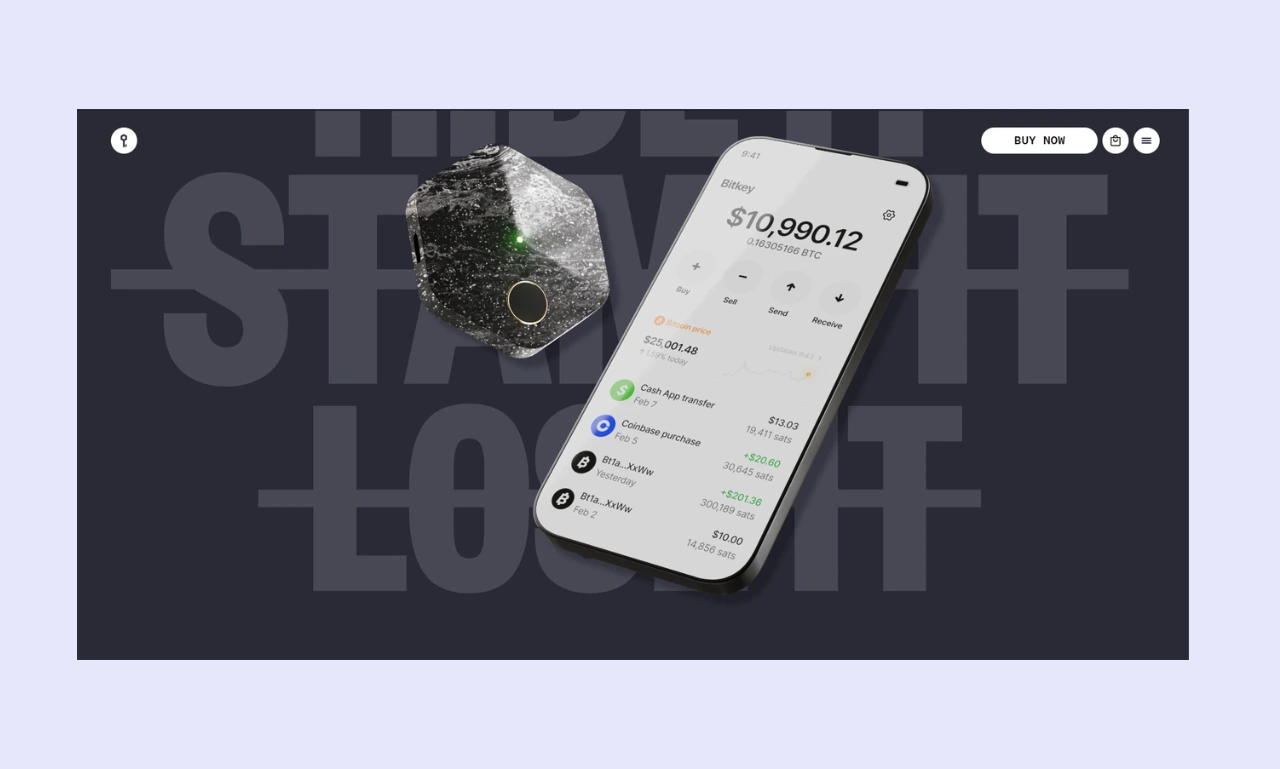
I found Bitkey relatively easy to use after a few minutes to familiarize myself with unlocking the device with a fingerprint and confirming transactions via NFC.
A 2020 Chainalysis report cited by Ledger and Bitget estimates that 20% of the Bitcoin supply has been permanently lost, largely due to misplaced or destroyed seed phrases. By eliminating seed phrases, Bitkey removes one of the largest risks for crypto investors, thereby improving the overall user experience.
While the devices are relatively straightforward, initially figuring out how to use a Bitkey hardware wallet can be slightly confusing at first. It doesn't feature a display, and the USB-C connector is only for charging, so there's no obvious way to connect it to a mobile phone.
Display & Buttons/Touchscreen

Unlike most other physical crypto storage devices, Bitkey wallets do not have a display or buttons. All actions are conducted via the Bitkey mobile app, while the actual device signs transactions via NFC. The app is intuitive and highly responsive, making it great for day-to-day use.
Because you manage the device via a mobile app, users don't have to worry about struggling to read key information (like wallet addresses) or accidental inputs, which are common on smaller devices like the Ledger Nano S Plus.
Bitkey Wallet Security Features
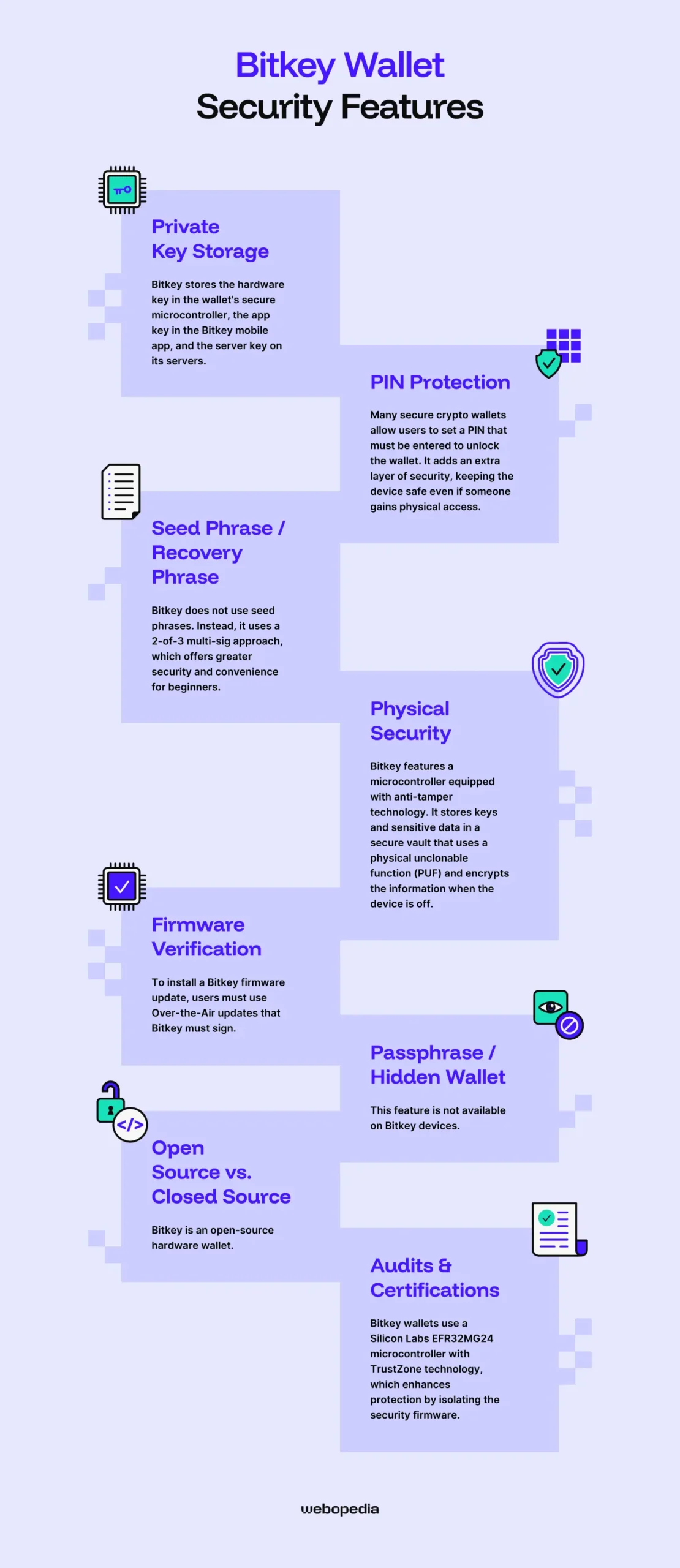
Certain cryptocurrency security features are essential for every hardware wallet. Aspects such as a secure element, a PIN system, and a seed phrase form the foundation of crypto security.
It's worth noting that when the Bitkey app displays a security alert, it uses the traffic light system to indicate severity. Green means everything is good, orange indicates a moderate issue (e.g., a new firmware update), and red indicates a severe issue (e.g., no paired device).
Private Key Storage
Bitkey splits the private key into three shares, each stored in a different location, creating redundancy.
Bitkey stores the hardware key in the wallet's secure microcontroller, the app key in the Bitkey mobile app, and the server key on its servers. It's worth noting that you/Bitkey cannot use the server key independently. It must be paired with a user-controlled key.
PIN Protection
Many secure crypto wallets allow users to set a PIN that must be entered to unlock the wallet. It adds an extra layer of security, keeping the device safe even if someone gains physical access.
However, Bitkey wallets don't include an on-device PIN system. Instead, they've opted for biometrics via a fingerprint scanner. In theory, Bitkey's system is far more secure as fingerprints are unique, while there's a fixed number of PIN combinations.
While it doesn't have a PIN for locking the device, users can protect the Bitkey app by requiring it to be unlocked with their phone's PIN, fingerprint scanner, or facial recognition. We recommend always utilizing both a fingerprint for the Bitkey wallet and a PIN or biometric for the mobile app.
Seed Phrase / Recovery Phrase
As we've touched on, Bitkey does not utilize seed phrases. Instead, it uses a 2-of-3 multi-sig approach, which offers greater security and convenience for beginners.
Seed phrases are secure. They're typically generated using 24 words from a 2048-word list, yielding a huge number of combinations and making brute-force attempts essentially impossible. However, seed phrases are a single point of failure. If they become lost, recovery is impossible.
Bitkey effectively splits the seed into three keys and automatically stores each one. This approach is far more beginner-friendly as manual backups are not required.
Even if you lose one key, you can still access your wallet using the other two. You can lose either your mobile device or your Bitkey hardware wallet and still have access to your wallet. However, if you lose both devices, recovery will be impossible.
Physical Security
Bitkey wallets do not use tamper-evident packaging, which makes it easier for bad actors to conduct a supply-chain attack in which the device is swapped for a compromised one.
Instead, Bitkey features a microcontroller equipped with anti-tamper technology. It stores keys and sensitive data in a secure vault that uses a physical unclonable function (PUF), encrypting the information when the device is off and rendering it usable only when the device is on.
Bitkey has also designed its hardware wallet so that if a bad actor attempted to open and physically modify it, the device would likely stop functioning, which provides resistance to direct attacks. Moreover, every Bitkey chip has a unique secret key, so only authentic devices can communicate with the Bitkey app.
Firmware Verification
Bitkey utilizes secure boot to ensure that firmware flashed to the device is genuine. You can only use firmware that Bitkey has signed with a Bitkey hardware wallet. It's impossible to reflash the firmware.
To install a Bitkey firmware update, users must use Over-the-Air updates that Bitkey must sign. Additionally, it's not possible to update the firmware on a locked Bitkey device; you must unlock the wallet before starting the update process.
Passphrase/Hidden Wallet
Hardware wallets commonly allow users to set a passphrase, effectively adding an extra word to the seed phrase. The user can unlock their main wallet but must enter the passphrase to access the secret wallet.
While hardware wallets like the Trezor Safe 5, the Ledger Nano X, and even other Bitcoin-only wallets like the Blockstream Jade support passphrase wallets, the feature is not available on Bitkey devices.
Open Source vs. Closed Source
Bitkey is an open-source hardware wallet. The code is publicly available on Bitkey's GitHub repository. However, there's another open-source project called Bitkey that's unrelated to the hardware wallet. If you want to audit Bitkey, ensure you're looking at the right one. The correct project should link to Bitkey.World.
So, are open or closed-source wallets better? There's no fixed answer. It depends on your preferences and opinion. Open-source projects are better aligned with the core ethos of cryptocurrency: transparency and decentralization. However, it's more challenging for bad actors to reverse engineer closed-source software to find vulnerabilities.
I typically prioritize open-source wallets as they're independently verifiable, and the community can work together to find and patch any exploits/bugs. However, there's generally nothing wrong with opting for closed source as long as the company is established and trustworthy.
Audits & Certifications
Bitkey wallets use a Silicon Labs EFR32MG24 microcontroller with TrustZone technology, which enhances protection by isolating the security firmware. While not independently rated, these chips are manufactured in accordance with specific industry standards to ensure they provide a predictable level of protection.
Instead of a Bitkey secure element, the company opted for a secure microcontroller (MCU) as it met both its security and transparency requirements. Because it took this approach, Bitkey doesn't feature an Evaluation Assurance Level (EAL) rating, which measures security and is commonplace on other hardware wallets.
Many hardware wallets choose to undergo independent audits by third-party firms such as CertiK or Hacken, though Bitkey hasn't taken this approach. However, anyone can independently review Bitkey's code and report their findings. That said, beginners and non-technical users cannot typically manually audit code.
So, is Bitkey safe even though it lacks official third-party audits or an EAL-rated secure element? There's not a single universal pass to digital asset protection. While third-party audits and recognized certifications help build trust, Bitkey has clearly invested effort in its own approach and created a secure wallet.
Supported Cryptocurrencies & Tokens
Versatility is important for a crypto wallet. Ideally, you should be able to interact with Decentralized Applications (dApps) like PancakeSwap and store all your cryptocurrencies and NFTs in one place. Therefore, you should consider your objectives before purchasing a specific hardware wallet.
Native Support
Bitkey is built exclusively for Bitcoin. Altcoins such as Ethereum, XRP, and Solana are unsupported, severely limiting the device's usability.
If you solely invest in Bitcoin (20.4% of investors say their portfolio is almost entirely Bitcoin, according to CoinGecko) or want to separate Bitcoin from your other holdings, then Bitkey devices can be solid choices. However, investors who hold multiple assets should consider an alternative, like the SafePal S1.
ERC-20 Tokens & Other Standards
As Bitkey wallets can only store Bitcoin, they do not support token standards from other networks. Even the Bitcoin Lightning Network is unsupported (though Bitkey has stated it's exploring how best to implement it).
If you want to invest in tokens built on networks like Ethereum, MetaMask is a popular software wallet, while Tangem hardware wallets support dozens of networks and over 16,000 assets.
Integration with Wallets/DApps/NFTs
Smart contracts (self-executing applications) are essential for the function of NFTs and dApps. However, they do not exist on the Bitcoin network, so they're unsupported. If you want to interact with Web3 platforms, look for wallets that support WalletConnect, as it facilitates seamless connections.
Connectivity & Compatibility
Being able to connect a hardware wallet to your preferred management device greatly enhances convenience and delivers a better user experience. Bitkey wallets are built for ease of use, so broad compatibility and straightforward connectivity are even more essential.
Connection Type
Bitkey wallets have two forms of connectivity, but only one is used to communicate with the Bitkey app:
- USB-C: Bitkey devices feature a USB-C port (with a USB-A adapter included in the box). However, the USB-C connection is only used for charging the hardware wallet, not connecting to mobile devices.
- NFC: Provides an easy way of connecting to a hardware wallet. Bitkey's integrated NFC chip lets people communicate and sign transactions by simply tapping their Bitkey to a mobile device. However, maintaining the closeness that NFC connections require can be inconvenient during longer processes, such as firmware updates.
I found Bitkey's communication systems to be easy and effective. My main complaint is having to hold the devices together during updates, which can be annoying due to the size and shape of the Bitkey. That said, most people have a USB-C cable and an NFC-enabled phone, so Bitkey is accessible.
Device Compatibility
While you can use the best hardware wallets across a wide range of devices and operating systems, some offer an experience tailored to a specific format. Bitkey wallets are compatible only with phones equipped with NFC and running Android (Nougat or later) or iOS (15.2 or later).
Companion App/Software
Because the hardware wallet lacks a display, all wallet management is completed via the highly rated (4.6/5 on the App Store and 4.1/5 on the Play Store) Bitkey app.
Bitkey devices are designed exclusively for Bitcoin, so the mobile app is relatively basic. It doesn't feature staking, tokens (assets built on another blockchain), or dApp connectivity. However, it does allow users to buy or sell Bitcoin and pass on their holdings via an inheritance tool.
I found the app intuitive and well-designed. It was easy to access key features and find transaction information. Moreover, the chart makes it straightforward to track the value of your Bitcoin. However, people looking for an all-in-one wallet will likely prefer an alternative, like the Trezor Safe 3.
Bitkey Wallet Advanced Features
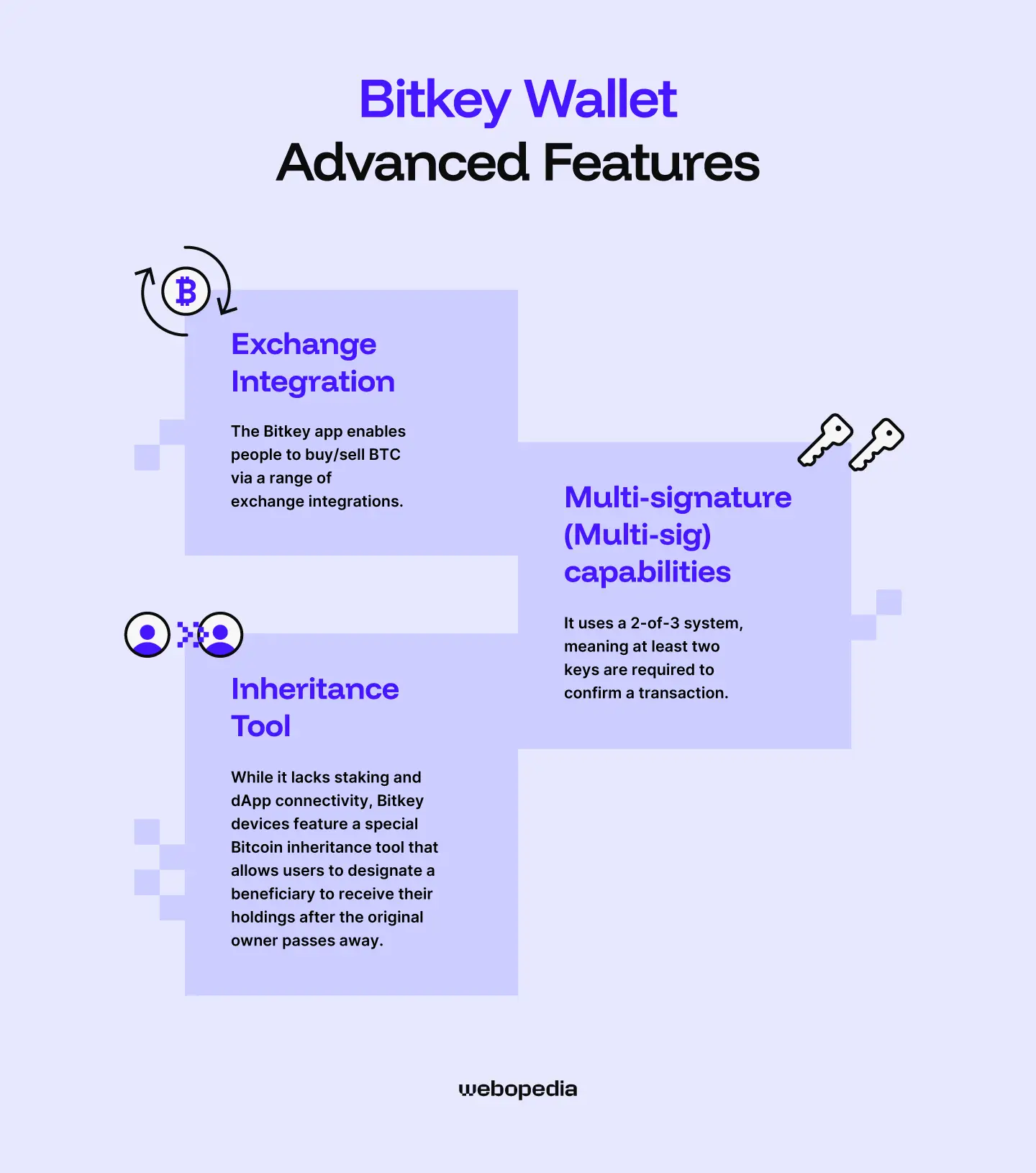
Every hardware wallet can complete the same essential functions: receiving, storing, and sending cryptocurrency. However, some wallets offer extra tools designed to enhance convenience or introduce new features. Although it's relatively basic compared to Ledger Live and Trezor Suite, the Bitkey app has some interesting features:
Exchange Integration
The Bitkey app enables people to buy/sell BTC via a range of exchange integrations. Bitkey has partnered with Cash App, Robinhood, Coinbase, and MoonPay, allowing in-app purchases to be automatically transferred to your Bitkey wallet.
However, users cannot swap Bitcoin for other assets, and transaction fees may be higher on the Bitkey app than on a dedicated exchange like Binance or Kraken.
Multi-signature (Multi-sig) Capabilities
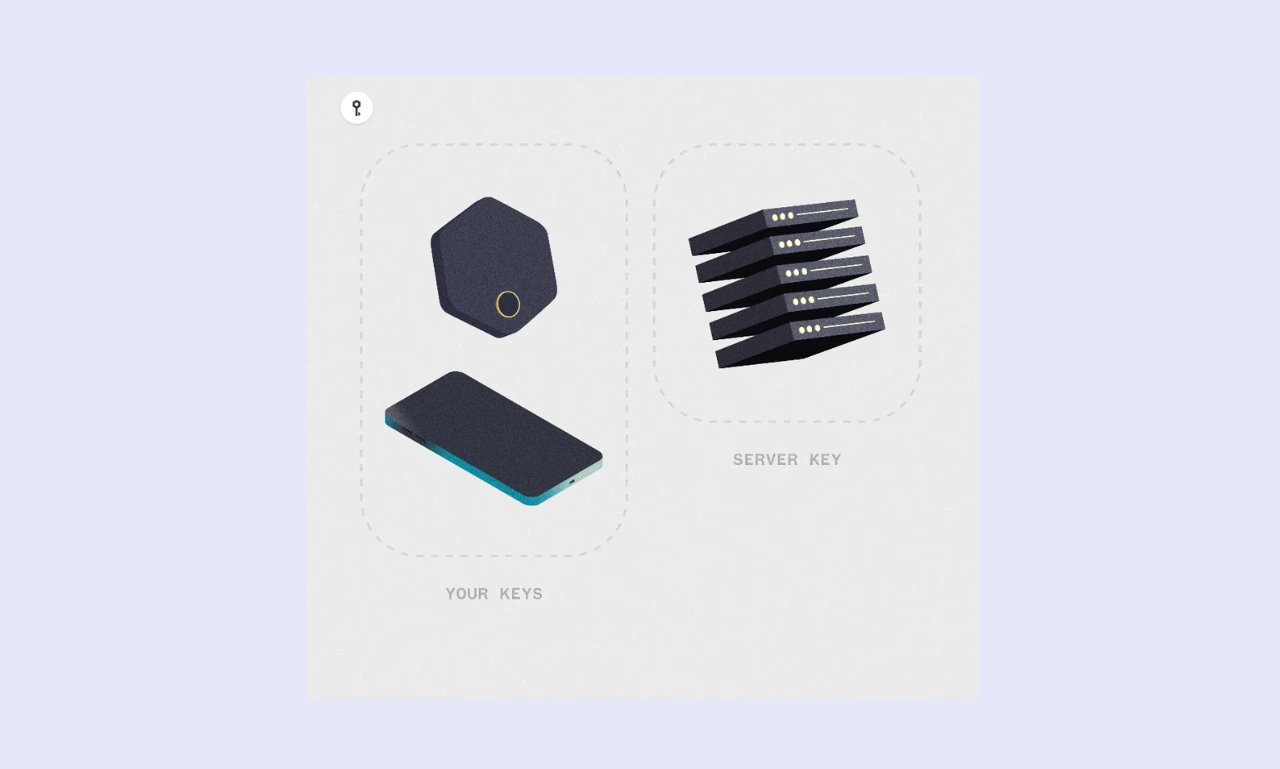
Multi-sig wallets require approval from multiple signees before they can confirm a transaction and send it to the blockchain for processing. Multi-sig is great for adding security to your wallet or protecting a joint pool of funds, for example, a company treasury.
Bitkey is one of the few hardware wallets to offer native multi-sig without requiring an additional device. It uses a 2-of-3 system, meaning at least two keys are required to confirm a transaction.
Bitkey automatically stores the three keys in separate locations: the hardware wallet, the mobile app, and Bitkey's servers. So, even if you lose your mobile device or your Bitkey, recovery is simple.
Users can optionally enable 'Delay + Notify', which sends a notification and pauses the recovery process for 7 days, giving the user ample time to prevent unauthorized access if they do not recognize the recovery attempt.
Inheritance Tool
While it lacks staking and dApp connectivity, Bitkey devices feature a special Bitcoin inheritance tool that allows users to designate a beneficiary to receive their holdings after the original owner passes away.
How does the inheritance tool work? Users assign a beneficiary (who must own a Bitkey) to initiate a claim via their Bitkey app. To prevent false claims, there is a six-month security period during which the primary user can cancel the transfer. After the waiting period elapses, the Bitcoin is transferred.
Pricing & Value for Money
Before you buy a Bitkey (or any other hardware wallet), consider the price. If a wallet costs more than the value of your portfolio, there's no point buying it. Likewise, if you're on a budget, there are plenty of affordable wallets that offer the same level of security as premium options.
Current Price
During my Bitkey review, I learned that the wallet’s price differs significantly between countries.
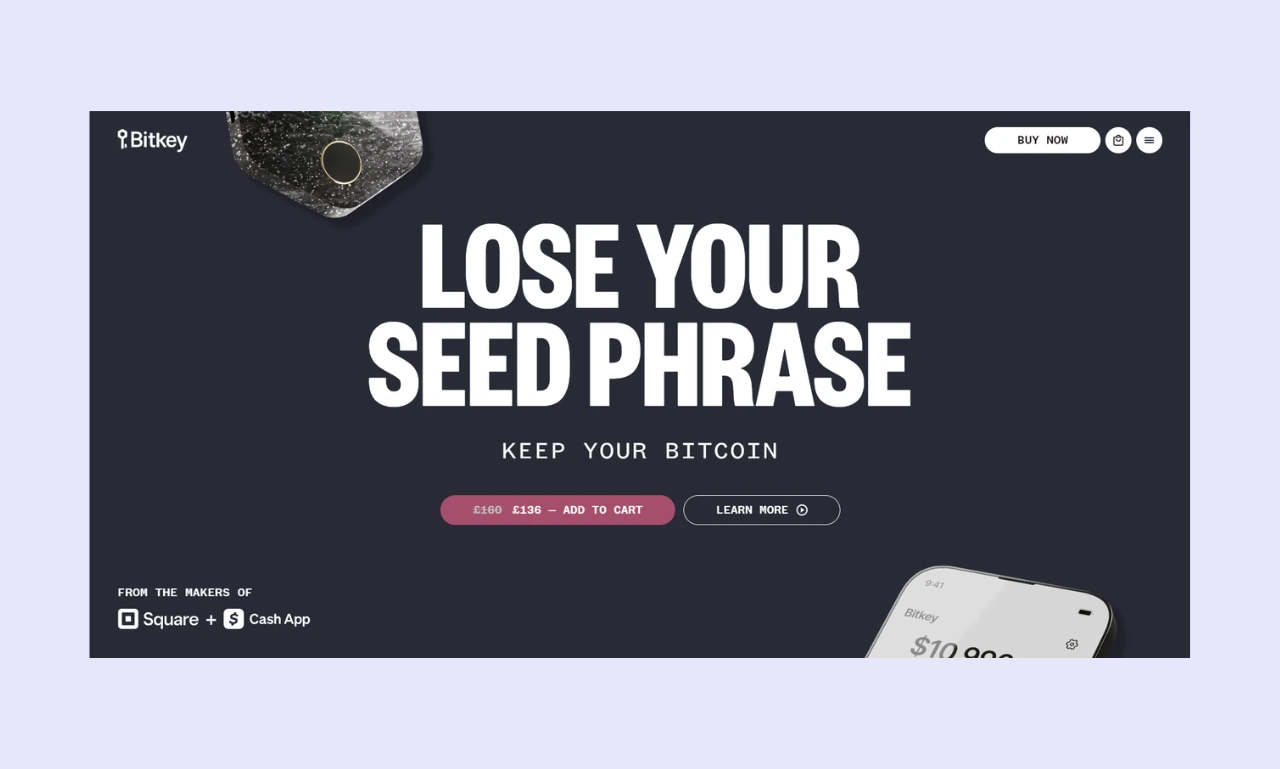
In the USA, people can buy a Bitkey for $99, but in the UK it costs £160 ($213) or £136 ($181) on sale. In Europe, it costs €145 ($167) or €99 ($114) on sale.
This pricing disparity makes it difficult to assess the value of a Bitkey wallet. It's far easier to recommend the device to an American Bitcoin investor than to someone from the UK, who has to pay more than twice as much (an amount that could purchase a better-equipped device).
What's included
When you buy a Bitkey device, you get access to a hardware wallet for signing transactions and a mobile app for managing the wallet. Bitkey doesn’t include accessories, but users don't need to buy anything else to get started. There is no seed phrase, so recovery sheets are not included.
Users will have to pay network fees when sending Bitcoin and transaction fees when buying or selling. While some wallets (Zengo) charge to use inheritance tools, Biteky includes the service with a standard wallet purchase.
Is it worth it?
When you're reading a Bitkey review, you want to know whether the device is worth buying. Unfortunately, there's no one-size-fits-all answer.
If you're a USA-based Bitcoin investor, then Bitkey devices are solid choices. However, people in the UK can purchase a more comprehensive alternative, such as the BitBox02 (Bitcoin-only or multi-asset), for a comparable price. Likewise, those interested in the broader Bitcoin ecosystem (Lightning Network) may prefer a Blockstream Jade.
Bitkey devices offer robust security and a reasonable feature set. For $99, the value proposition is strong. However, for over $200, it's far weaker. So, while Bitkey wallets can be worth it for USA-based investors, they're not for people in other regions or those who want to store multiple assets.
Bitkey Hardware Wallet - Compared
Having the essential aspects of a wallet clearly displayed can be a big help in the decision-making process. Knowing how the options stack up makes it far easier to select the one best suited for your needs.
| Wallet Name | Bitkey | Ledger Nano X | Blockstream Jade Classic | Bitboxo2 |
|---|---|---|---|---|
| Security Architecture | Open-source, multi-sig, seedless | Open-source, EAL5+ secure element | Open-source, virtual secure element | Open-source dual security chip |
| Supported Assets | Bitcoin | 15,000+ | Bitcoin + Liquid Network Assets | Bitcoin or 1,500+ assets (multi-asset edition) |
| Price | $99 (USA), €145 (Europe), £160 (UK) | $99 | $79 | $172 |
| Ease of Use | Beginner-friendly (NFC takes some getting used to) | Suitable for everyone | Approachable, but Liquid assets can be confusing | Straightforward and easy to use |
| Connectivity | USB-C (charging), NFC | USB-C, Bluetooth | USB-C, Bluetooth, QR Code | USB-C, Bluetooth (BitBox02 Nova-only) |
| Display | N/A | 1.1-inch monochrome | 1.14-inch | 1.38-inch OLED |
| Advanced Features | Inheritance, fiat on/off ramp | Staking, dApp connectivity, fiat on/off-ramp, secret wallets | Lightning Network support, fiat on/off-ramp, third-party wallet connectivity | Fiat on/off-ramp, staking, Bitcoin insurance |
| Build Quality | Premium. Unique design with stainless steel backing | Solid. Metal cover with plastic housing | Budget. Mostly semi-transparent plastic | Premium. Large display, sleek/modern design |
| Customer Support | Help center, ticket system | Help center, AI chatbot, ticket system | Help center, live chat, ticket system | Help center, ticket system, paid video calls |
- Bitkey is great for people who invest solely in Bitcoin, but those with diverse portfolios must select a multi-asset alternative like the Ledger Nano X.
- While Ledger, Blockstream, and BitBox feature displays for verifying sensitive information, Bitkey wallets are managed entirely via the mobile app.
- While other wallets use USB-C or Bluetooth for connectivity, Bitkey wallets use NFC, which has a considerably shorter range.
Who is Bitkey Best Suited For?
While many hardware wallets are designed for general use, Bitkey has tailored its devices for a highly specific group: Bitcoin investors who do not use the Lightning Network or hold other assets. However, due to the ease of signing transactions, Bitkey wallets are suitable for long-term storage and day-to-day transactions.
If you're looking for the best crypto cold storage device for altcoins or for Web3/dApps interactivity, you'll need to choose an alternative. Ledger and Trezor are well-known hardware wallet manufacturers that are more versatile, supporting a wider range of assets and third-party integrations.
Conclusion & Final Verdict
If you invest solely in BTC, it may be beneficial to use a Bitcoin-only wallet. They can offer slightly enhanced security as potential attack vectors are reduced (fewer supported networks means fewer potential exploits).
During this Bitkey review, I learned that the wallets lack a seed phrase and instead use a 2-of-3 multi-sig system, which removes the single point of failure inherent to seed-based wallets. Moreover, they feature a fingerprint scanner, eliminating the need to set a PIN, and NFC for straightforward transaction signing.
While they lack compatibility with the broader crypto ecosystem, Bitkey wallets are excellent choices for beginners and people who want to secure their Bitcoin without the complexity of traditional hardware wallets. However, people who want to interact with dApps or store multiple assets in one place should consider alternatives.
FAQs (Frequently Asked Questions)
Can I use Bitkey with my phone?
Bitkey hardware wallets are designed specifically for mobile use. Although they feature a USB-C port, it’s only used for charging. Instead, Bitkey uses NFC for connectivity, so it’s not compatible with laptops or desktop computers. The Bitkey mobile app is available on both Android and iOS devices.
What happens if I lose my Bitkey?
Bitkey devices are designed with redundancy in mind. Because they feature a 2-of-3 multi-sig setup (wallet, app, server), a user can lose either their mobile device or their Bitkey hardware wallet and still use the other (in conjunction with the server key) to regain wallet access.
Can Bitkey freeze my wallet?
Bitkey wallets are self-custody or non-custodial, meaning that the user has complete control over the wallet and its private keys. As such, it’s impossible for Bitcoin or any other intermediary or authority to freeze your wallet. Only custodial wallets managed by the issuer can be frozen.
How do I update my Bitkey's firmware?
Bitkey has simplified the firmware update process. When a new update is available, users will see an orange notification in the Bitkey app. Navigate to the security hub, then tap ‘Update firmware’, and keep the Bitkey close to your mobile to maintain the NFC connection throughout the update process.