- ELLIPAL Wallet Review: Pros & Cons
- First Impressions & Unboxing
- Alternatives To Ellipal Wallet
- Initial Setup & User Experience
- Ellipal Wallet's Security Features
- Supported Cryptocurrencies & Tokens
- Connectivity & Compatibility
- Advanced Features
- Who is ELLIPAL Wallet Best Suited For?
- Conclusion & Final Verdict
- FAQs (Frequently Asked Questions)
ELLIPAL Wallet Review 2026

- When you click links on this page, we may earn an affiliate commission. By using this website you agree to our terms and conditions and privacy policy.
- Participation in online gambling may be illegal in your country and is subject to age restrictions (18, 19, or 21, depending on the jurisdiction). Verify legality and age requirements before participating. Learn more
Crypto enthusiasts may want to enhance security when storing large sums, holding assets for extended periods, or for peace of mind. A hardware wallet, such as those offered by ELLIPAL, is ideal for these purposes.
ELLIPAL’s hardware wallets are physical crypto storage devices tailor-made for digital assets. They use secure element chips to prevent tampering and require device access to unlock the wallet and send transactions. This provides a physical layer of security that software wallets such as Bitget Wallet do not.
Throughout this ELLIPAL wallet review, we’ll examine and compare the ELLIPAL Titan 2.0, Titan Mini, and X Card. Each wallet offers robust security, but is tailored to different use cases. We’ll cover the key features of each model and highlight who they're best suited to. Let’s get started.
Key Takeaways
- The Titan series uses cameras to scan QR codes, while the X Card wallet utilizes NFC.
- Investors can only use ELLIPAL wallets with mobile devices as they do not support desktop computers.
- You have to manually flash firmware to ELLIPAL devices. Ensure you only download it from the official website.
- ELLIPAL Titan wallets are great for daily use and verifying sensitive information, while X Card wallets excel at long-term storage.
ELLIPAL Wallet Review: Pros & Cons
Pros
- The ELLIPAL Titan 2.0 and Mini feature an EAL5+ secure element, while the X Card features an EAL6+ chip.
- Every ELLIPAL wallet is managed via the ELLIPAL app, which offers features such as staking, swaps, and a fiat on/off ramp.
- ELLIPAL’s hardware wallets are available at three different price points, ensuring the devices equally cater to budget-conscious investors and those seeking a premium experience.
- Every ELLIPAL model is 100% air-gapped and non-custodial, so private keys/seed phrases are kept offline.
- ELLIPAL wallets support more than 10,000 cryptocurrencies, making them great for people with diverse portfolios.
Cons
- ELLIPAL devices lack native multi-sig capabilities, which could be an issue for people wanting to maximize their protection.
- The firmware update process is straightforward but manual. A streamlined process could benefit beginners.
First Impressions & Unboxing
First impressions are a big deal. They tailor your opinion of a product and set the tone for your overall experience.
Packaging
When you buy an ELLIPAL hardware wallet, it will be shipped in a plain box to prevent damage to the device during transit and to complicate supply chain attacks.
The wallets come in a well-constructed, branded box with clear plastic shrink wrap. There are no tamper-evident stickers, but the seal provides a barrier that buyers can inspect to determine whether someone has attempted to compromise or access their device. Contact ELLIPAL support if you believe your wallet has been tampered with.
What's in the box?
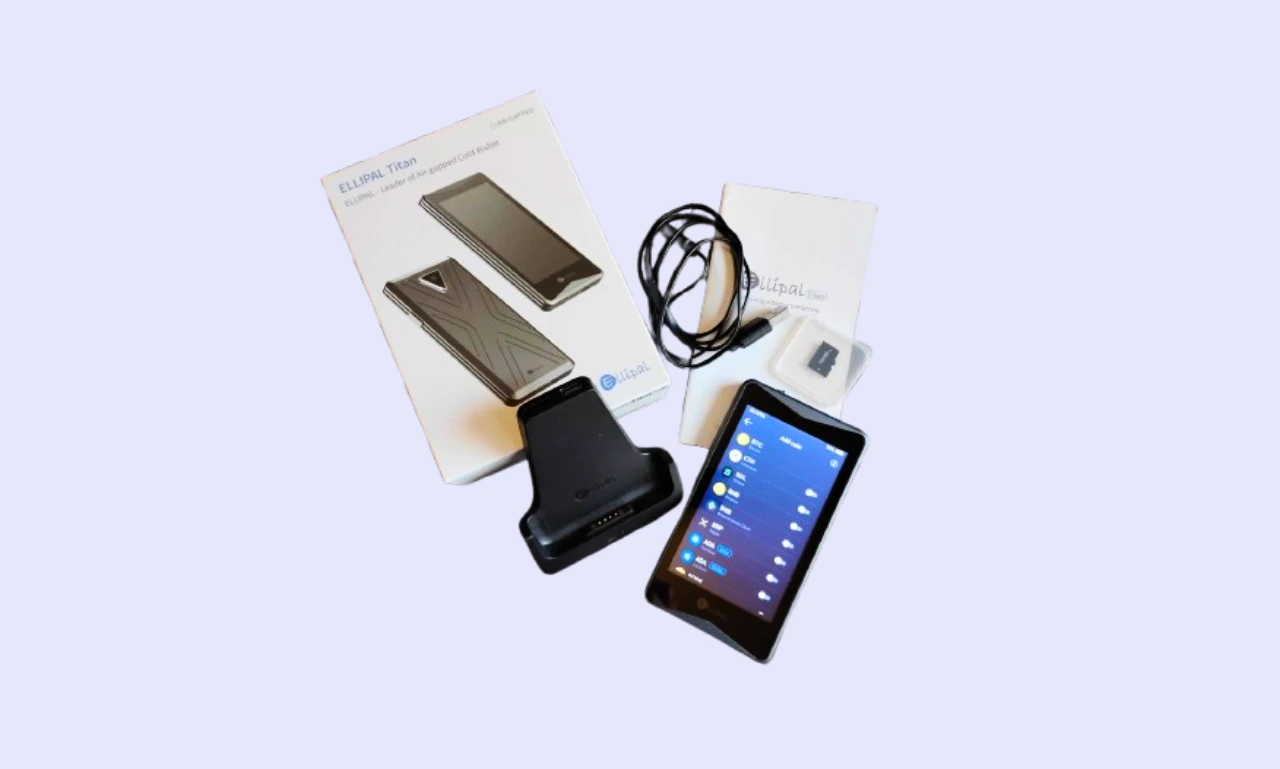
When you buy an ELLIPAL Wallet, you receive a few extra items in the box. In addition to the wallet, you'll receive:
- A security adapter (used to charge the device and install SD cards)
- A Type-C charging cord
- A user manual
- An SD card,
- Two seed phrase recovery sheets.
The included extras are the same for every ELLIPAL wallet. However, there are no lanyards or stickers, unlike some hardware wallets. However, ELLIPAL devices come with everything investors need to get started.
Build Quality
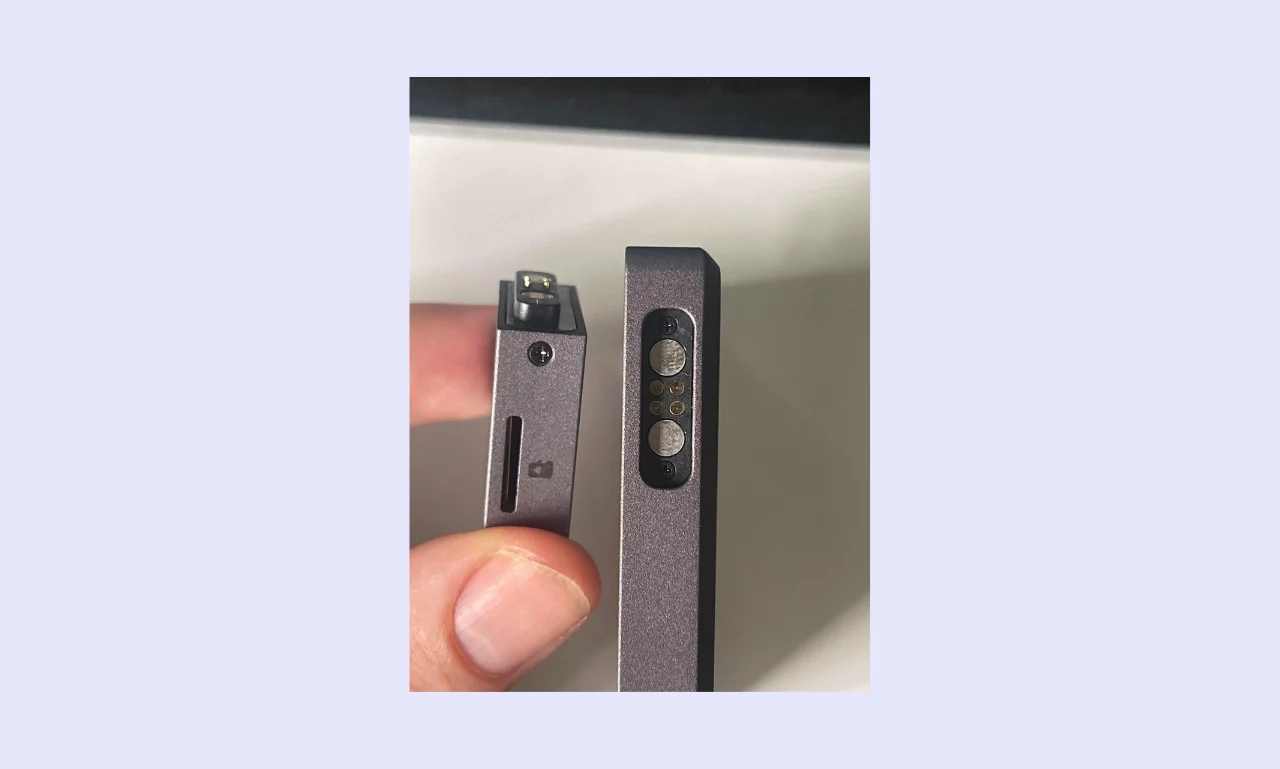
The ELLIPAL Titan 2.0 and Titan Mini use a fully sealed metal construction, making it difficult to access their internal components. The X Card is a durable, NFC-enabled plastic card (rated for 30 years). It comes with the X Card Starter device, which is used to set up X Cards.
During testing for this ELLIPAL Wallet review, I found the devices feel premium and robust in hand, like they could take a few drops without issue. The Titan wallets are protected by a one-year warranty, covering issues arising from regular use.
Titan wallets are first-rate in terms of aesthetics. Their metal body and touchscreen give them a stylish, modern look. The Titan 2.0 features a gold border around the camera and grooves in the back. X Cards feature a sleek black design that wouldn’t look out of place in a wallet.
ELLIPAL Products, Pricing & Value for Money
ELLIPAL devices offer excellent security, broad asset support, and a great mobile experience. However, price is one of the most important factors when deciding whether to buy an ELLIPAL wallet.
ELLIPAL Titan 2.0
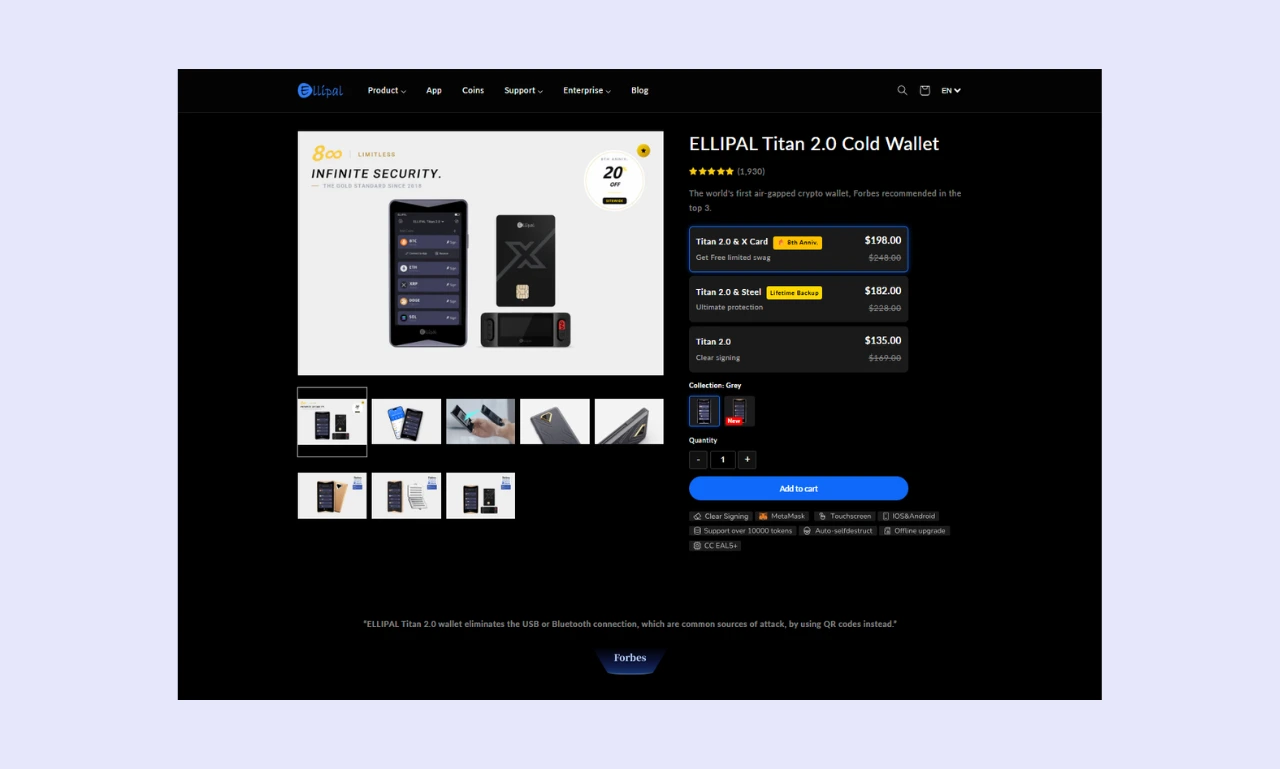
The Titan 2.0 is ELLIPAL’s flagship product. It’s 100% air-gapped, scanning QR codes to securely sign transactions. It features a large 4-inch touchscreen for easy navigation and costs $169. The device supports over 10,000 assets and has an EAL5+ secure element and an anti-tamper self-destruct mechanism.
With simple Decentralized Application (dApp) connectivity and a streamlined user experience, the ELLIPAL Titan 2.0 blends convenience and security. The large display makes navigating the wallet and verifying sensitive information easier than with the Titan Mini or X Card.
ELLIPAL Titan 2.0 Price ($169): The Titan 2.0 is ELLIPAL's flagship hardware wallet. It features a large, 4-inch screen to simplify asset management. A $199 bundle contains the Titan 2.0 and an ELLIPAL Seed Phrase Steel recovery backup.
ELLIPAL Titan Mini
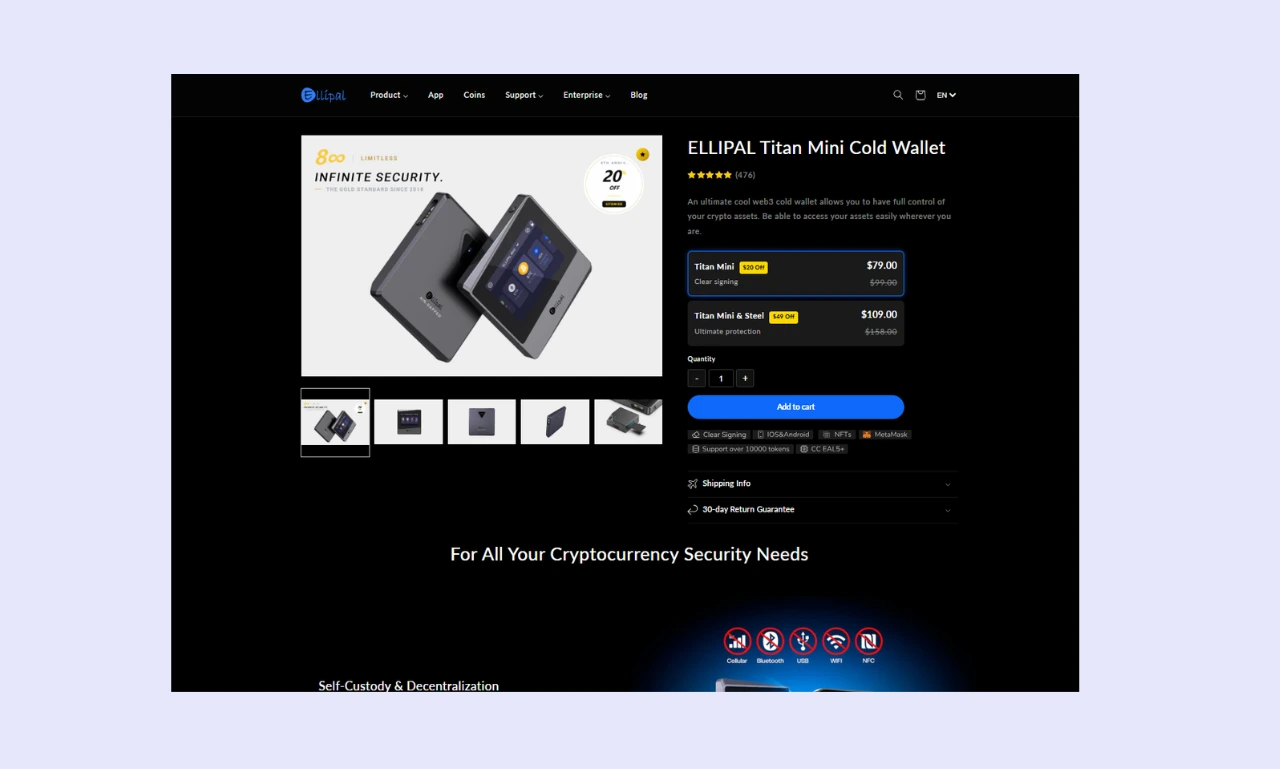
As the name suggests, the ELLIPAL Titan Mini is a smaller version of the main Titan Wallet, making it ideal for travel. However, the smaller 2.7-inch touchscreen display makes missinputs significantly more likely. While pocket-friendly, the Titan Mini’s battery is weaker than the regular Titan's (600 mAh vs. 1400 mAh).
Despite its smaller form factor, the Titan Mini boasts the same core features as the larger Titan 2.0: an EAL5+ secure element, anti-tamper self-destruct mechanism, and support for 10,000+ cryptocurrencies. However, it’s roughly half the price at $79, making it a budget-friendly crypto cold storage solution.
ELLIPAL Titan Mini Price ($99): The Titan Mini offers the same security features as the 2.0, but with a smaller form factor (a 2.7-inch screen) and a lower price.
ELLIPAL X Card
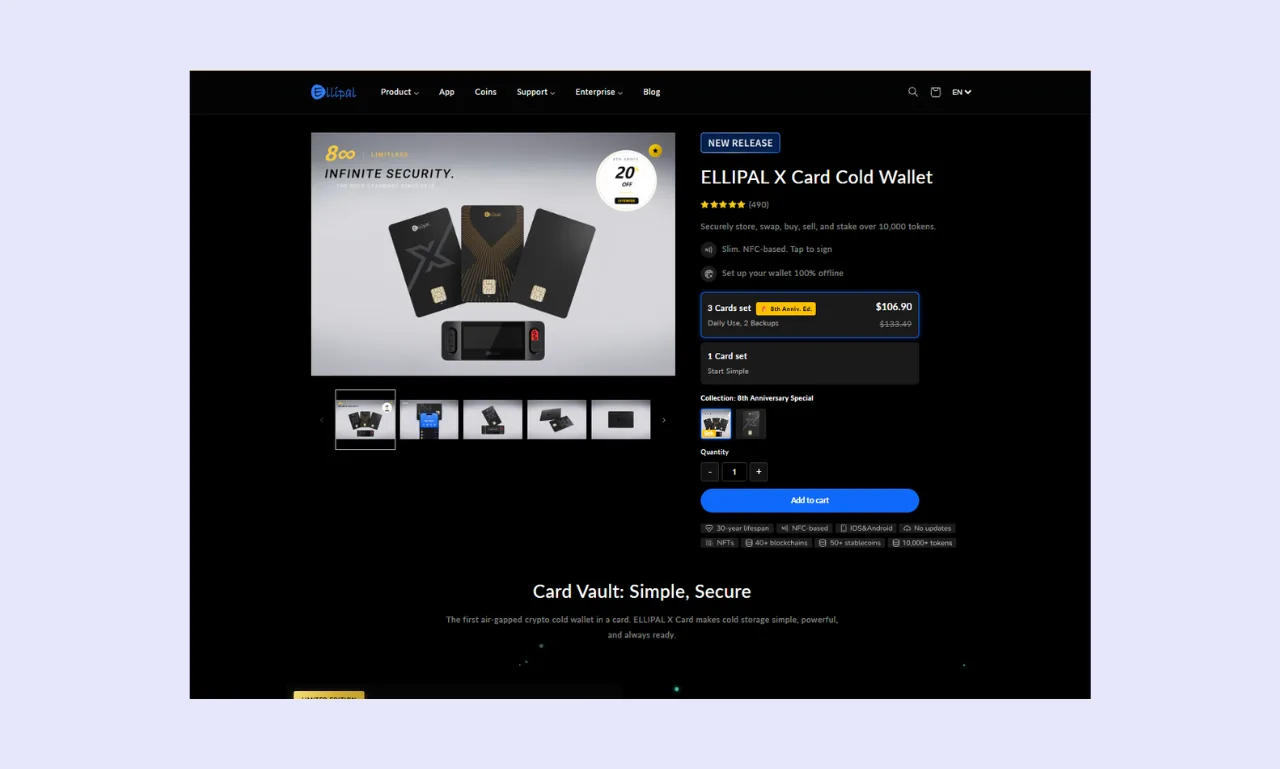
For people wishing to maximize their security over extended periods, the ELLIPAL X Card could be ideal. It uses an entirely different system compared to Titan models. It relies on a mobile device for wallet management and signs transactions offline via NFC.
The X Card doesn’t feature a display; it must be managed using a mobile device. ELLIPAL has given it a 30-year lifespan, and the X Card comes in multiple colors, offering some customization. If you’re looking for durability and long-term support, the X Card is the Best hardware wallet ELLIPAL offers.
ELLIPAL X Card Price ($79): The X Card is an NFC-based crypto storage solution consisting of offline cards and a vault device for interacting with them. A 3-card bundle is available for $133.49.
What's included?
For the price, you'll receive an ELLIPAL Wallet and a handful of accessories, including a seed phrase recovery sheet and an SD card (Titan models only) for firmware updates. Users also get access to the ELLIPAL app. However, it can be downloaded and used without buying a wallet.
ELLIPAL also offers a steel seed phrase storage device, but you must purchase it separately for $49 or bundle it with a Titan 2.0 for $199 or a Titan Mini for $109.
Alternatives To Ellipal Wallet


Initial Setup & User Experience
The user experience is a key aspect for any product used directly by customers, especially one that investors must trust to keep significant sums of money secure. Here’s how ELLIPAL’s range of devices performed across this essential metric:
How to Set Up Ellipal Wallet
Struggling to work out how to use an ELLIPAL wallet? The setup process changes depending on whether you’re using a Titan 2.0/Mini or an X Card device. We’ve provided ELLIPAL wallet setup guides that cover both options to help beginners get started with as little friction as possible.
Step 1: Create an ELLIPAL Wallet or Recover from Seed Phrase
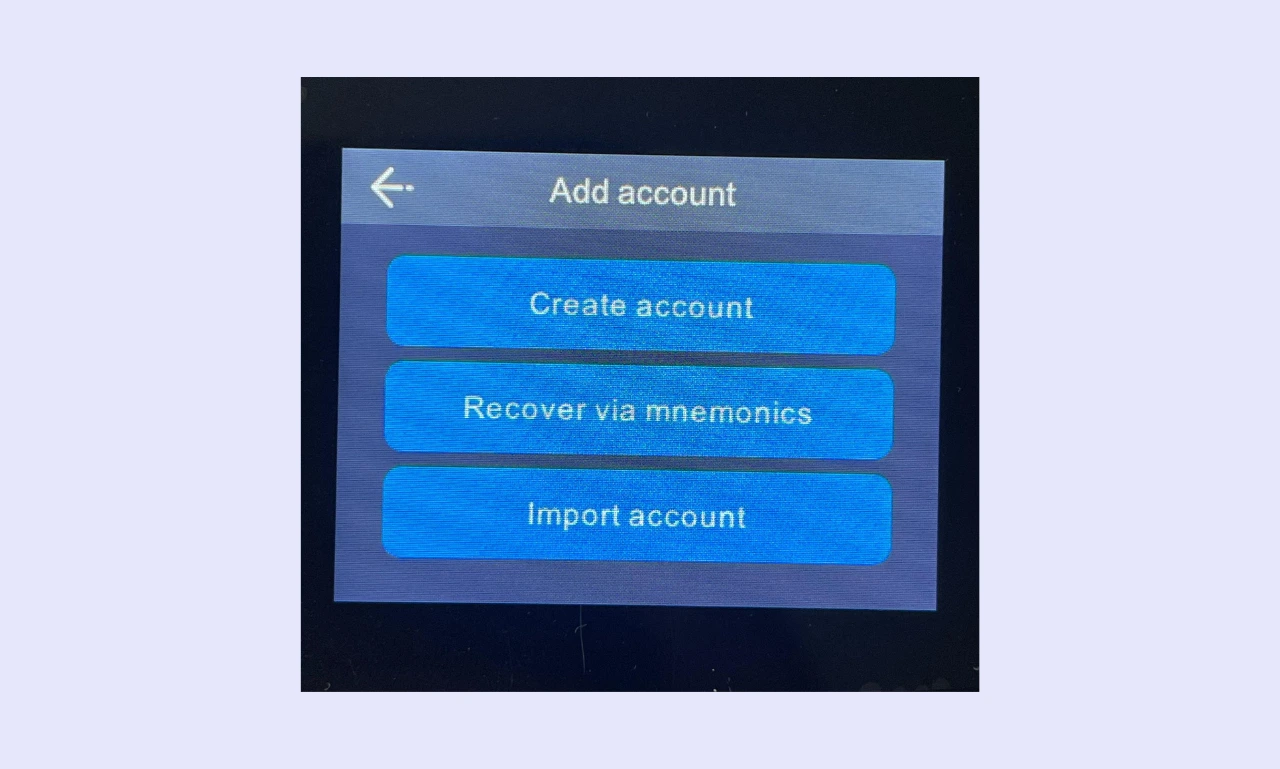
You can either create a new wallet or import an existing one. You'll have to choose a name, and then it will guide you through the setup process. If you already have a wallet, choose 'Recover via mnemonics'.
Step 2: Choose a Password
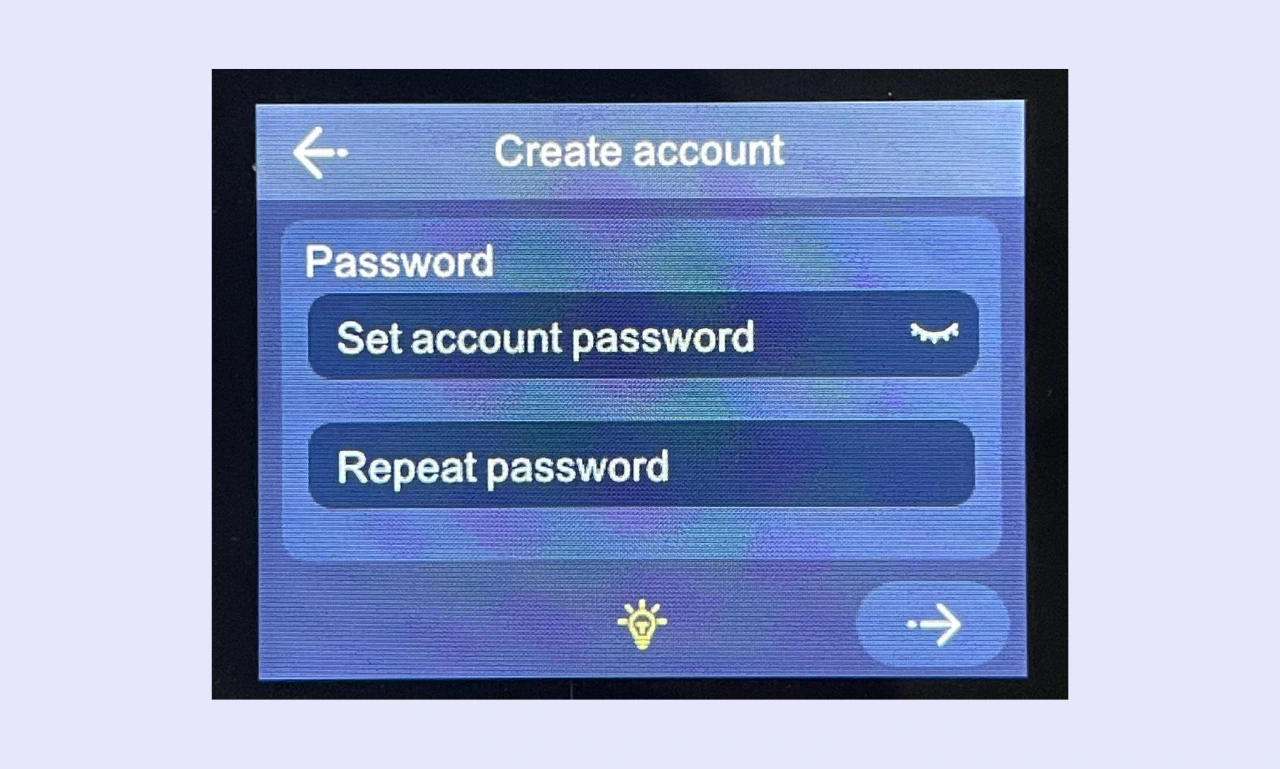
You’re required to set a password to add additional protection to your wallet. Ensure it’s unique, secure, and memorable. Backing up a password using an external password manager is recommended to avoid accidentally losing access.
Step 3: Backup Mnemonics
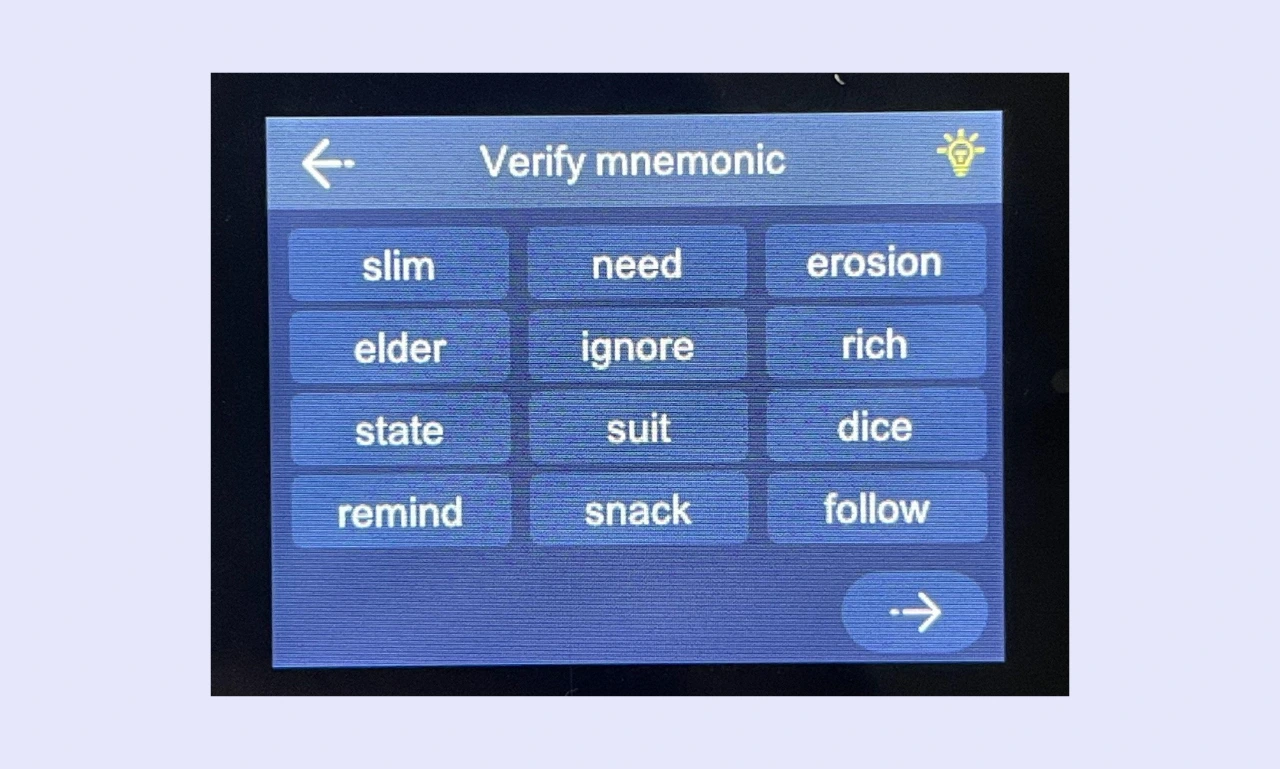
You must choose between a 'Segwit' or 'General' Bitcoin wallet. You should typically select SegWit, as it’s more recent and has lower fees. Ensure that you securely back up your ‘mnemonic’ or seed phrase using an analog method like pen and paper or an ELLIPAL Steel Seed Backup.
Step 4: Choose Coins and Deposit
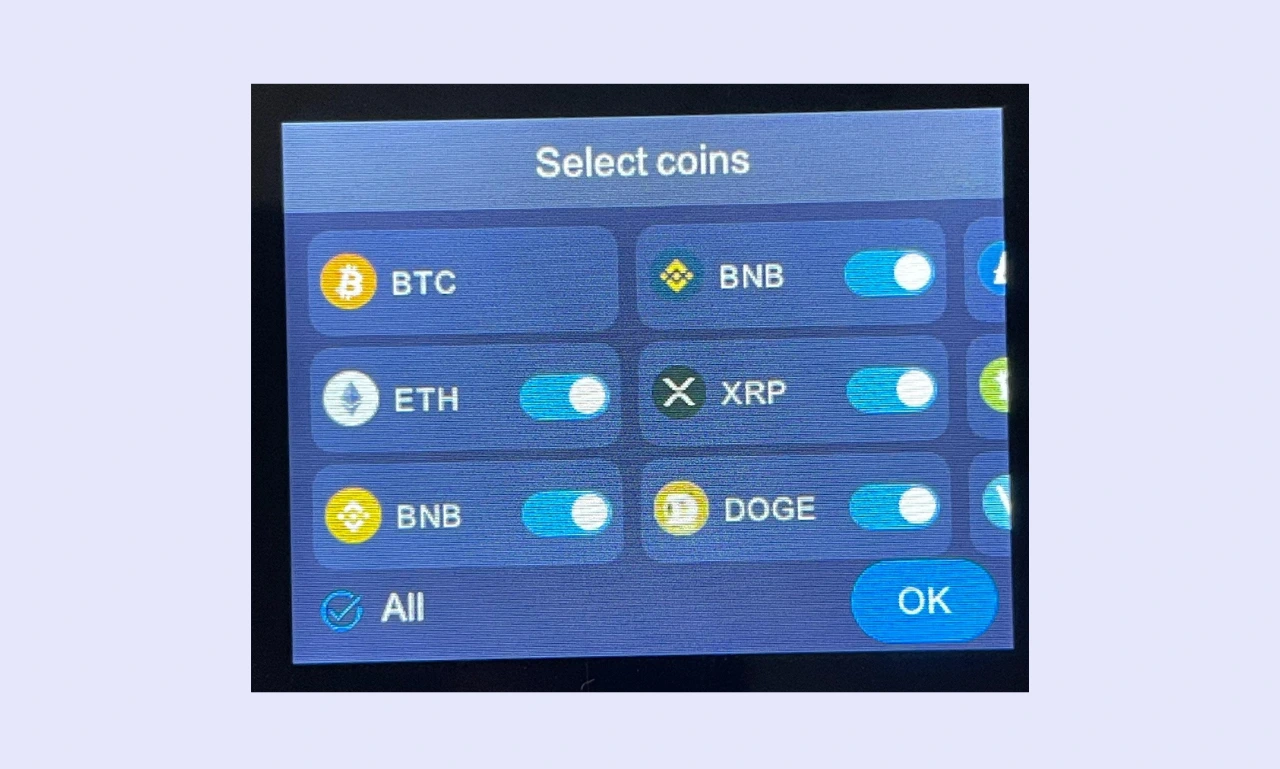
You must select which coins you want to store in your wallet. You can add additional assets later, so don't worry if you’re not 100% which assets you’ll invest in. You can now send/receive crypto using your ELLIPAL Wallet. Tap an asset and select 'Receive' to view your wallet address.
How to Set Up ELLIPAL X Card
The setup process for ELLIPAL X Card devices differs significantly. However, the process remains quick and easy.
Step 1: X Card Starter
When you buy an X Card pack, it comes with a starter device. Ensure it’s charged, insert an X Card, and follow the on-screen instructions to create your wallet.
Step 2: Connect to the ELLIPAL App
Next, you’ll need to download the ELLIPAL mobile app. After opening the app, you’ll need to select ‘Cold Wallet’, choose ‘X Card’, enter your PIN, and tap the X Card to your phone to complete the NFC connection.
Step 3: Manage Your Wallet
After connecting the X Card to your ELLIPAL mobile app, you’re ready to swap, stake, send, and receive crypto assets. Being a secure crypto wallet, you’ll need to tap your X Card each time you want to sign a transaction.
Is Ellipal Wallet Easy to Use?
Simplicity is essential for a hardware wallet. They're complex devices by nature, so setting up and using them should be as easy as possible.
Sending funds is easy with Titan models because the ELLIPAL app lets you copy/paste or scan QR code wallet addresses and sign transactions using the integrated camera. Because they have a battery and connect to mobile devices, you can use ELLIPAL wallets away from home, without electricity or a computer.
While it takes a different approach, X Card units offer similar functionality. Setting up and using the wallet is simple. Users can QR code addresses via a mobile app, and transactions are signed by tapping the card against their mobile, which can be more convenient than scanning QR codes.
Whether you prefer the ELLIPAL Titan 2.0, Titan Mini, or X-Card wallet, the barrier to entry is minimal. Even someone entirely without crypto wallet experience will be able to get to grips with the devices after reading the included manual and spending a few minutes exploring.
Display & Buttons/Touchscreen
The ELLIPAL Titan 2.0 and Titan Mini only feature a power-on/off button. The touchscreen is clear and responsive, so it’s easy to read and navigate. While the Titan 2.0's 4-inch screen makes it a non-issue, taps can become muddled on the smaller 2.7-inch Titan Mini.
ELLIPAL X Cards do not feature a battery, display, or buttons. However, the X Card starter unit features four buttons (up/down, power on/off, confirm), a USB-C port, and a slot for inserting X Cards. The device also features a small display for managing the setup process.
Ellipal Wallet's Security Features
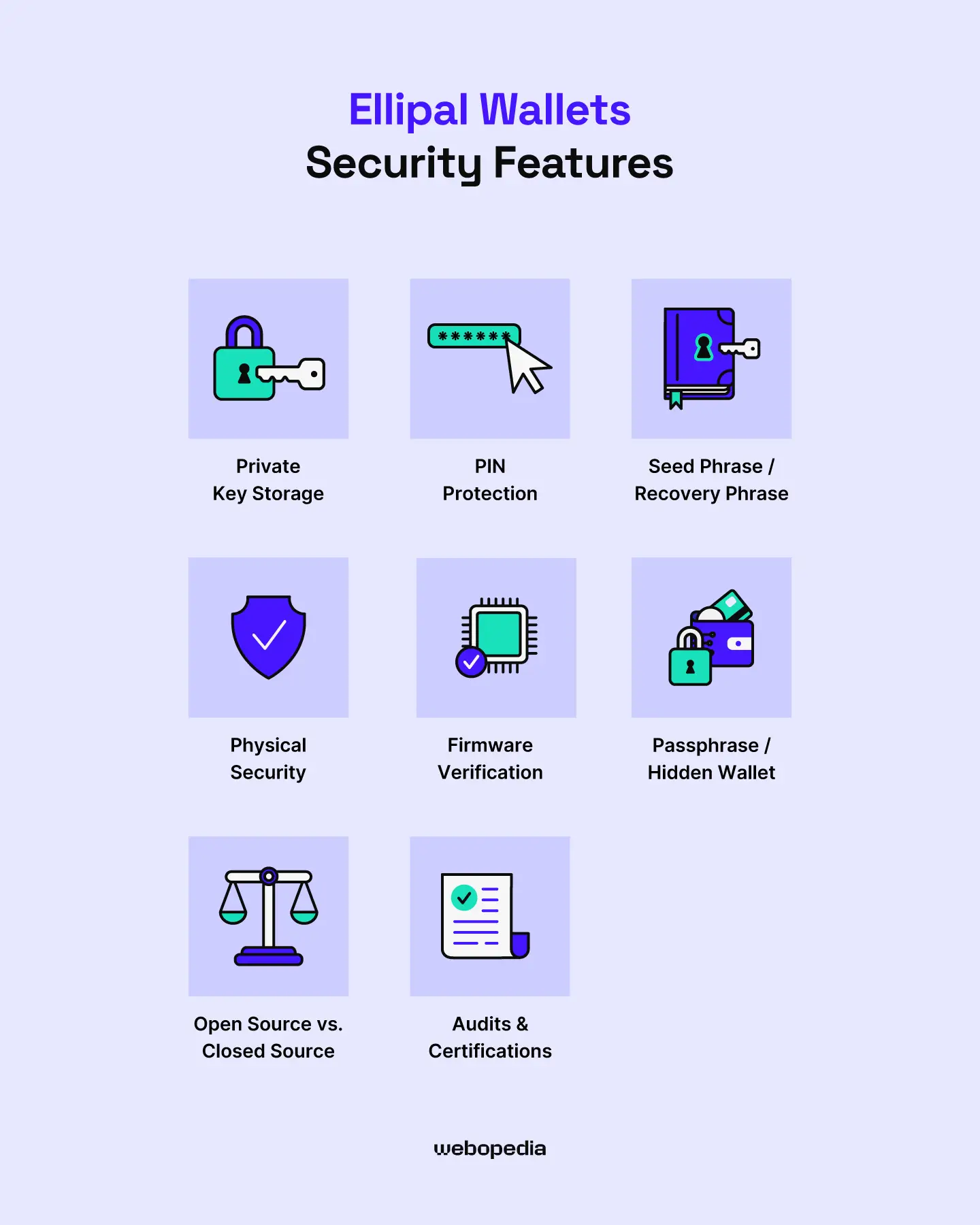
Private Key Storage
Every ELLIPAL hardware wallet is 100% air-gapped, meaning the private keys are stored locally, on a secure element. By taking this approach, ELLIPAL ensures that private keys/seed phrases never leave the device and cannot be intercepted via a network attack.
The Titan 2.0 and Titan Mini are both protected by an EAL5+ ELLIPAL wallet secure element. However, the X Card wallet uses a superior EAL6+ chip, providing the same level of protection as popular hardware wallets like the Trezor Safe 5.
PIN Protection
When setting up an ELLIPAL wallet, you can choose a PIN that you must enter to access it.
Additionally, ELLIPAL wallets feature a passphrase system that adds an extra layer of protection. It effectively adds an additional word to the seed phrase.
While a PIN or passphrase system might not seem like it offers much in the way of protection, it protects against brute-force attacks, where people repeatedly enter a PIN/passphrase to try to force access. After 10 incorrect password attempts, the device will ‘self-destruct’ and automatically wipe all its data.
Seed Phrase / Recovery Phrase
ELLIPAL wallets feature dedicated chips that generate random numbers in a secure, unpredictable manner for seed generation, enhancing digital asset protection. The Titan 2.0, Titan Mini, and X Card Starter use BIP39 to generate seed phrases based on the output of the random number generator.
While the ELLIPAL Titan 2.0 only supports creating 24-word mnemonics with an optional 25th word (secret passphrase wallet), the Titan Mini and X Card support 12, 15, 18, 21, and 24-word seed phrases.
You cannot view your seed after setting up the wallet, so making backups and storing them securely is crucial to prevent losing access to your funds.
ELLIPAL offers a steel seed phrase storage device ($59) that lets people secure their wallets without worrying about ink fading or fire damage. That said, paper backups are fine if they are stored well.
Physical Security
Is ELLIPAL Wallet safe? The devices are designed to combat supply chain attacks in which bad actors compromise a cold wallet during shipping. To this end, ELLIPAL Titan wallets are entirely metal and fully sealed. X Cards are a single piece of plastic with an integrated chip, so modification is impossible.
The devices will self-destruct if tampering is detected or if someone enters the incorrect passphrase 10 times, providing additional protection against supply-chain attacks and brute force attempts.
ELLIPAL could improve its packaging by introducing tamper-evident stickers or a similar protective measure that makes it obvious if the device has been compromised during shipping. However, the wallet's box comes with a tightly sealed plastic wrap and anti-scratch stickers on the screen and camera, so users can detect any tampering.
Firmware Verification
Verifying the integrity of ELLIPAL firmware before flashing it to your hardware wallet is advisable. It ensures that you do not accidentally use malicious firmware, which could compromise your wallet and cause losses.
Only ever download firmware from the official ELLIPAL website. Any other sources are likely spreading malicious firmware. Users can verify their firmware by uploading the .bin file to an approved checksum tool and comparing it to the hash stored in a text file. Both files are included in the firmware download folder.
Passphrase/Hidden Wallet
Most users are happy to set up a PIN and use a cold wallet without much extra thought. It provides peace of mind and excellent security, but what if you want to take things further?
ELLIPAL wallets feature a secondary, hidden passphrase wallet. Users set up a passphrase that will only unlock the secondary account, so even if someone forces you to open your wallet, you can access a fake account containing a small amount of crypto, serving as a decoy to protect your primary holdings.
Open Source vs. Closed Source
ELLIPAL uses a combination of open and closed-source software to enhance security and maintain privacy. All ELLIPAL wallets use closed-source firmware to prevent reverse engineering and exploitation by bad actors. ELLIPAL also runs a bug bounty program to encourage people to report vulnerabilities and help secure the firmware.
The system for scanning QR codes to verify transactions uses an open data format so people can confirm that it's operating correctly and not validating false transactions. Similarly, the ELLIPAL firmware update mechanism is open source, enabling independent audits.
Audits & Certifications
One way to measure a crypto wallet's security is through Evaluation Assurance Level (EAL) ratings. The ranking scale goes from 1 to 7, with EAL7 being the highest possible rating.
The ELLIPAL Titan 2.0 and Titan Mini have been awarded an EAL5+ rating, the same as a Ledger Nano X, one of the most popular offline wallets on the market.
However, the X Card wallet has achieved EAL6+ certification, the second-highest level any hardware wallet has achieved. This rating places the ELLIPAL X Card on par with wallets like the Trezor Safe 5 and the Ledger Stax.
Although a professional third-party firm like SolidProof or CertiK has not audited ELLIPAL, it has expressed interest in the idea. It ran a poll on its X account asking followers how important an audit is to them and which companies they trust.
Supported Cryptocurrencies & Tokens
Before buying a hardware wallet to enhance your cryptocurrency security, it’s essential to familiarize yourself with the assets it supports. Otherwise, you could end up wasting money on a device that can’t handle your main investments. So, what ELLIPAL wallet coins are supported?
Native Support
Over 10,000 ELLIPAL Wallet coins are supported. The Tian 2.0, Titan Mini, and the X Card all support the same extensive range of assets, which include prominent assets, such as:
- Bitcoin
- Ethereum
- XRP
- Cardano
- Litecoin
- Solana
- Tron
ELLIPAL devices can also store many lesser-known cryptos, making them excellent for altcoin traders, memecoin enthusiasts, or people who like to speculate on new projects. Some smaller assets available to store on ELLIPAL include Bancor, Flux, and Songbird, but thousands are supported.
ERC-20 Tokens & Other Standards
Users seeking a secure crypto wallet to store assets across various blockchains will find ELLIPAL wallets a strong choice. They support 40+ unique blockchains and 16 token standards, including ERC-20, BEP-20, and SPL.
With support for over 10,000 assets and the ability to easily connect to dApps across a wide range of networks, ELLIPAL wallets are ideal for people who invest in a broad range of assets and those who like to test and explore various blockchains.
NFT Support
Non-Fungible Tokens or NFTs took the world by storm in 2021. Although interest has waned somewhat, NFTs remain popular today. Collections like Pudgey Penguins and CryptoPunks command multi-thousand-dollar price tags, underscoring the importance of NFT storage.
While support for NFTs can vary across hardware wallets, every ELLIPAL wallet model can store Ethereum and Polygon NFTs. Thanks to ELLIPAL’s WalletConnect integration and broad network support, users can easily connect to NFT marketplaces like OpenSea to buy and sell digital assets.
Integration with Wallets/DApps
Connecting to Decentralized Applications (dApps) vastly expands a wallet's capabilities, as dApps offer a broad range of products. They can be yield farming platforms, Decentralized Exchanges (DEXs), NFT marketplaces, and much more. Users connect their wallet to a dApp, enabling them to easily fund a platform or withdraw assets.
While testing ELLIPAL’s Bitcoin wallets, I found they support WalletConnect, enabling connections with many dApps, including Uniswap and Pump.Fun. Users can connect to dApps by scanning QR codes, keeping private keys offline, and enhancing security.
ELLIPAL Titan models are MetaMask compatible. People can use their ELLIPAL device to sign MetaMask transactions, significantly improving security. Moreover, it’s possible to recover wallets from other providers, such as Trust Wallet or Exodus, to an ELLIPAL wallet using the seed phrase.
Connectivity & Compatibility
It’s easy to overlook, but a hardware wallet’s connections significantly impact usability. Some wallets do not support certain devices. For example, people must use NFC-only wallets with a mobile device because they do not support desktops.
Connection Type
The Titan 2.0 and Mini use a custom magnetic adapter to prevent unwanted connectivity while ensuring straightforward charging. The adapter connects to the device and contains a Micro SD slot and a USB-C port (which can only charge the device, not transfer data).
The ELLIPAL X Card uses a slightly different connection system. The X Card Starter features a USB-C port, but the X Card itself doesn’t have a battery or need to be plugged in. Instead, it utilizes low-energy NFC to communicate with mobile devices.
ELLIPAL wallets feature zero external connectivity. They lack Bluetooth, WiFi, or other wireless communication standards (although the X Card uses NFC). It features a camera for scanning QR codes and a touchscreen, but that's all users can interact with.
Device Compatibility
During our ELLIPAL wallet review, I found that the device cannot connect to desktop PCs or laptops, which could be an issue for power users or people who prefer managing their investments on a larger screen.
Instead, the ELLIPAL companion software is exclusively available as a mobile app for Android and iOS devices. However, a mobile app enhances convenience for most people. For example, people can manage the X Card on their mobile devices and easily fit it into a wallet. As such, it’s highly portable and excellent for travel.
Companion App/Software
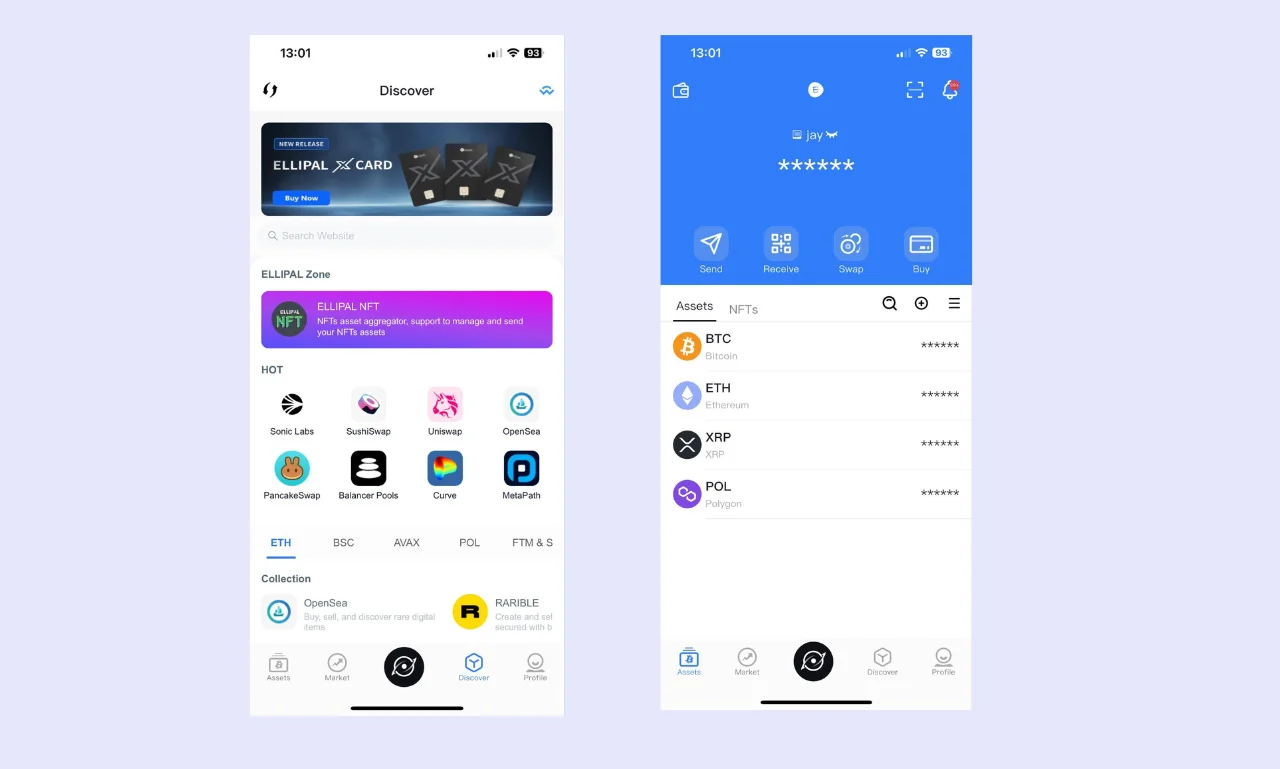
The ELLIPAL app is the wallet's companion software. It's used for almost every operation. I tested the app and liked the portfolio management capabilities.
Users can view, swap, buy, or sell crypto assets. It also offers a privacy tool that obscures balances. Navigation is straightforward, and key features are easy to access, but portfolio value can take a few seconds to update.
The ELLIPAL app provides general market data, tracks crypto prices, and offers information similar to CoinMarketCap. It has a 'Discover' section that enables people to connect to dApps securely.
The app offers staking for five assets, login via PIN or biometric security, and an address book to add frequently used wallet addresses. The ELLIPAL app can also be used as a standalone hot wallet, making it appealing for beginners who are debating whether a hardware wallet is right for them.
Advanced Features
While the primary function of ELLIPAL’s hardware wallets is to securely store cryptocurrency, they also offer several additional features that enhance convenience, particularly for day-to-day use.
Staking & DeFi Integration
If you buy an ELLIPAL Wallet, you'll be able to stake five cryptos directly in the app:
- Cosmos (10%)
- Polkadot (8.8%)
- Kusuma (7.3%)
- Cardano (5%)
- Tezos (3.69%)
The app includes links to dApps such as Lido, Aave, and Compound. As such, users can easily connect to external staking or yield farming protocols and other DeFi products. This provides much broader staking support and allows people to browse providers for the best yield.
Exchange Integration
In addition to easily connecting to various DEXs, including PancakeSwap and Jupiter Exchange, the ELLIPAL app features a built-in crypto-to-crypto swaps tool.
Although the swaps tool supports only 72 assets, it offers a much more convenient alternative to manually connecting to a dApp or transferring funds to an exchange. It has also integrated Simplex and MoonPay to offer fiat on/off-ramp services.
Multi-signature (Multi-sig) capabilities
Multi-sig wallets are advanced digital asset protection systems. While regular wallets require a single signature to approve a transaction, multi-sig wallets require multiple signatures. Multi-sig wallets typically require majority approval to process a transaction. For example, 3-of-4 signatures, although the specific requirements can vary.
Unfortunately, ELLIPAL wallets lack native multi-sig support. It’s a feature that users have been requesting for several years. However, it’s possible to link multiple ELLIPAL wallets to a third-party multi-sig wallet. However, this approach requires owning at least three ELLIPAL wallets, which will significantly increase costs.
Is buying an Ellipal Wallet worth it?
Whether an ELLIPAL Wallet is worth it compared to alternatives will depend on your requirements. The devices support 10,000+ assets and can store unlimited cryptocurrencies, making them highly valuable for people with diverse portfolios.
The lack of external connectivity is a significant advantage in an industry that is vulnerable to digital attacks. ELLIPAL hardware wallets are fully air-gapped and sign transactions via QR codes. While inconvenient for daily transactions, it makes transactions far easier, as users do not have to worry about mistyping wallet addresses.
With convenient dApp access, EAL5+ or EAL6+ secure elements, broad asset support, and native staking, ELLIPAL’s hardware wallets are highly versatile. Moreover, they’re available at three price points, allowing users to pick one that fits their budget. Overall, ELLIPAL wallets are solid and will be worth it for most people.
ELLIPAL Wallet Comparison
Figuring out which wallet is best can be difficult. There’s no one-size-fits-all answer. Instead, consider your personal requirements and compare them with each wallet’s offerings. To simplify this process, we’ve created the table below, which provides a brief hardware wallet review of ELLIPAL’s devices and a couple of other popular options.
| Wallet Name | ELLIPAL Titan 2.0 | ELLIPAL Titan Mini | ELLIPAL X Card | Ledger Nano X | Trezor Safe 5 |
|---|---|---|---|---|---|
| Security Architecture | Air-gapped, EAL5+ secure element | Air-gapped, EAL5+ secure element | Air-gapped, EAL6+ secure element | EAL5+ secure element, proprietary operating system | Open source, EAL6+ secure element chip |
| Supported Coins/Tokens | 10,000+ | 10,000+ | 10,000+ | 20,000+ | 1,000+ |
| Price | $169 | $99 | $79 | $149 | $169 |
| Ease of Use | Simple to use, large screen for easy inputs | User-friendly, small screen makes inputs harder | Takes some getting used to, but it's simple | Beginner-friendly, supports desktop/mobile devices | Straightforward, mobile/desktop support |
| Connectivity | Camera for scanning QR codes, security adapter with USB-C | Camera for scanning QR codes, security adapter with USB-C | NFC for management, USB-C for charging X Card Starter | USB-C, Bluetooth | USB-C |
| Display | 4-inch touchscreen | 2.7-inch touchscreen | N/A (small screen on X Card Starter) | 1.09-inch OLED | 1.59-inch touchscreen |
| Advanced Features | Staking, on/off-ramp, crypto-to-crypto swaps, secret wallet | Staking, on/off-ramp, crypto-to-crypto swaps, secret wallet | No battery, staking, dApp connectivity, crypto-to-crypto swaps, passphrase wallet | Staking, in-built, swaps tool, buy/sell crypto | Buy/sell crypto, staking, swaps, hidden wallet |
| Build Quality | Solid metal, fully sealed | Solid metal, fully sealed | Durable plastic, 30-year lifespan | A mixture of metal and plastic | Gorilla Glass front, plastic, aluminum |
| Customer Support | Live chat, email, help center | Live chat, email, help center | Live chat, email, help center | Live chat, email, help center | Support center, AI bot, ticket system |
- While the Ledger Nano X features USB and Bluetooth connectivity for convenience, the ELLIPAL Titan 2.0, Titan Mini, and X Card are fully air-gapped.
- The large screen of the Titan 2.0 can make it easier to manage your funds and control the wallet compared to the Titan Mini.
- The Nano X and Safe 5's small form factor makes them more portable than the bulky Titan 2.0.
- Wallet addresses must be entered manually in Ledger Live or Trezor Suite, while ELLIPAL Titan wallets have a camera for scanning QR codes.
Who is ELLIPAL Wallet Best Suited For?
ELLIPAL Wallets suit a broad range of users. They’re highly versatile and have solid fundamentals (security, convenience, accessibility, additional features, etc). However, every investor has unique requirements. So, instead of providing a blanket recommendation, we’ll highlight which type of investor could benefit from each of ELLIPAL’s wallets.
The Titan 2.0 and Titan Mini each feature the same core security features. The only noticeable difference is screen size and design. If you struggle to read or type on smaller screens, then the Titan 2.0 is the best choice, while budget-conscious investors may prefer the Titan Mini.
If you’re looking to maximize your security over extended periods, then the X Card is by far the best option. It’s cost-effective, doesn’t require charging, and has an estimated lifespan of 30+ years. Moreover, X Card wallets are easy to store/transport as they’re roughly credit card-sized.
If you’re making your first venture into the market and only hold a small amount of cryptocurrency, you could be better off with a non-custodial hot wallet like MetaMask or the Bitget Web3 wallet.
For most people, we advise maintaining a hot wallet for trading, daily transactions, and dApp interactions, and purchasing a hardware wallet as your portfolio grows or if you plan on holding assets for long periods.
Conclusion & Final Verdict
If you’re looking for a secure, convenient, and cost-effective crypto storage solution, then ELLIPAL’s range of hardware wallets is worth considering. Three models are available at different price points. Each is air-gapped, equipped with a secure element, and managed via the ELLIPAL mobile app.
The best ELLIPAL wallet will differ depending on your goals and preferences. It’s advisable to make a list of your requirements and consider what type of trader/investor you are. Once you have an idea of which capabilities are most important for you, selecting a wallet becomes far easier.
Our ELLIPAL wallet review found that the Titan 2.0 is best for people seeking a large display or a premium device, while the Titan Mini is a strong choice for those prioritizing portability, and the X Card wallet is excellent when affordability and long-term storage are paramount.
FAQs (Frequently Asked Questions)
Can I use an ELLIPAL Wallet with my phone?
ELLIPAL wallets are specifically designed to work with Android and iOS mobile devices. They’re managed via the ELLIPAL app, which offers features like staking and swaps. Because ELLIPAL’s wallets rely on scanning QR codes or using NFC, they do not support desktop computers.
What happens if I lose my ELLIPAL Wallet?
Even if you lose your ELLIPAL wallet, you can still recover it as long as you have access to your seed phrase. As such, it’s essential to back up your seed phrase and store it in a secure location, separate from the hardware wallet.
Can ELLIPAL freeze my wallet?
ELLIPAL’s hardware wallets are 100% air-gapped and non-custodial. No intermediary or third-party, including ELLIPAL, can access or freeze a hardware wallet. However, because ELLIPAL has no seed phrase or private key access, it cannot help with recovery.
How do I update the firmware on my ELLIPAL wallet?
The ELLIPAL wallet firmware update process is relatively simple. Users check what version their wallet is running, download the firmware from the official ELLIPAL website, insert the SD card into the adapter, navigate to settings, and then follow the on-screen instructions. ELLIPAL X Card wallets do not require updates.