Binance Web3 Wallet Review 2026

- When you click links on this page, we may earn an affiliate commission. By using this website you agree to our terms and conditions and privacy policy.
- Participation in online gambling may be illegal in your country and is subject to age restrictions (18, 19, or 21, depending on the jurisdiction). Verify legality and age requirements before participating. Learn more
Binance wallet is owned by one of the world's largest crypto exchanges, Binance. It allows you to store, send, receive, and swap tokens across multiple blockchains. The only fundamental difference is that, unlike Binance, holding your funds on their centralized exchange (CEX), you're in total control of your Web3 wallet, which is the whole point of a self-custody setup.
You can use it as a browser extension on Chrome and Firefox, or through the Binance app on both Android and iOS. It's built to handle decentralized applications (dApp), token swaps, and cross-chain transfers all in one place, so you don't need to juggle multiple tools to get things done.
You are about to learn how Binance Wallet works in 2026, what it offers in terms of features and supported networks, how secure it is, how it stacks up against other popular wallets, and how to set it up.
Pros & Cons of Using Binance Web3 Wallet
Pros
- It is a keyless Non-custodial (no seed phrase is required)
- Built-in staking & swaps
- Supports multiple blockchains
Cons
- Internet-connected (hot) = higher attack risk
- No hardware isolation
- Limited support for certain chains
What makes Binance Wallet Different?
In this section, I've put together a closer look at Binance Wallet's main features, including how it handles swap fees, DeFi access, token support, and more.
| Feature | Comment | Our Rating |
|---|---|---|
| UX & Design | Clean layout with easy navigation, though mobile users share the interface with the broader Binance app, which can feel cluttered | 4/5 |
| Security Model | Self-custody with local key storage and biometric login on mobile, but the lack of hardware wallet support is a downside | 4.5/5 |
| Supported Coins | 100+ chains and all major token standards covered, giving you access to a huge range of tokens and NFTs | 4.5/5 |
| dApp/DeFi Access | Built-in dApp browser and swap functionality make it easy to interact with DeFi protocols without leaving the wallet | 4/5 |
| Fees & Swaps | No extra fees beyond standard network costs, and swap rates are pulled from multiple liquidity sources for better pricing | 4/5 |
| Open-source Status | The wallet is not fully open-source, which limits independent verification of its code | 2.5/5 |
| Customer Support | You get access to Binance's full support system plus active community channels, but wallet-specific help can be harder to find | 3/5 |
Who Is Binance Wallet Best For?
Binance Wallet works well for people who already use the Binance exchange and want an easy way to explore DeFi without switching between platforms. If you're into token swaps, cross-chain transfers, or interacting with decentralized apps (dApps), it covers all of that.
It's also a solid pick as a MetaMask or Trust Wallet alternative if you prefer to manage everything from one ecosystem. That said, complete beginners might find the setup a bit technical at first, while more experienced DeFi users who want deeper customization could feel limited compared to standalone wallets like MetaMask or Phantom.
Binance Wallet Top Features
Binance Wallet operates like most wallets, making it easy to use for both newbies and experienced users (especially those with Binance Exchange accounts). This section covers everything you need to know about Binance wallet in 2026, from setup and daily use to security, supported tokens, DeFi features, fees, and customer support.
Installation & Setup
| Platforms | Chrome and Firefox browser extension; Android and iOS via the Binance app |
| File Size | ~5 MB for the browser extension; mobile app size varies as it includes the full Binance ecosystem |
| KYC Required | KYC is required for using the Binance Exchange, so it is indirectly required to use the Keyless wallet. |
| Backup Options | It is a keyless wallet, so you can only lose access to your account if you don't have access to your Binance account |
| Biometric Login | Available on mobile (fingerprint and face recognition) |
Binance Wallet Interface
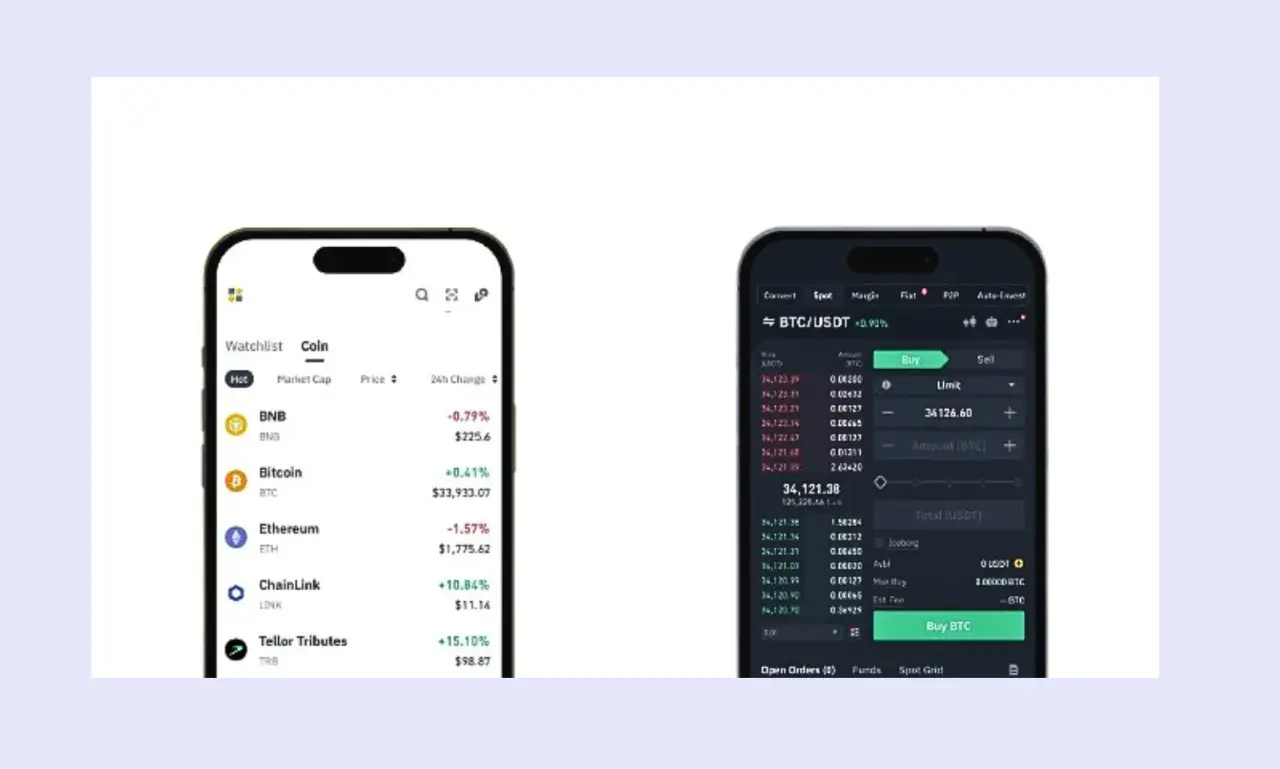
| Design | Clean and minimal layout that keeps things simple, with your balance, tokens, and recent activity all visible on the main screen |
| Navigation | Straightforward tab-based menu for switching between your portfolio, swaps, and dApp browser without much digging around |
| Multi-action Support | You can swap tokens, bridge across chains, and interact with dApps all from within the wallet |
| Dark Mode | Available on both the browser extension and mobile app |
Security & Privacy
| Custody Model | Self-custody private key control wallet, meaning you hold your own keys, and Binance has no access to your funds |
| Key Storage | Private keys are stored locally on your device and encrypted |
| Biometric/PIN | Biometric unlock on mobile; password protection on the browser extension |
| Open-source | The wallet code is not fully open-source |
| Audit | Binance has undergone third-party security audits at the platform level, though specific wallet audit details are limited |
| Data Analytics | Some usage data may be collected through the Binance ecosystem; no detailed standalone privacy policy for the wallet |
| Backup | It is a keyless wallet (no seed phrase or private key is required), so you can only lose access to your account if you don't have access to your Binance account |
| Recovery Flow | You can always recover your account with your Binance logins because they are linked. This makes recovery easy. |
Token Support
| Supported Chains | Over 100 blockchains, making it one of the best wallets for Ethereum, best wallets for BNB, and best wallets for Solana, with support for Polygon, Arbitrum, Avalanche, Optimism, and more |
| Token Standards | ERC-20, BEP-20, SPL, and other major token standards, depending on the connected chain |
| NFTs | You can view and manage NFTs directly in the wallet across supported networks |
| Taproot | No native Bitcoin Taproot support |
| Custom Tokens | You can manually add custom tokens by entering the contract address |
DeFi, Swaps & Staking
| WalletConnect | Supported, so you can connect to a wide range of dApps and DeFi platforms |
| Built-in DEX | Yes, token swaps are available directly inside the wallet without needing to visit an external exchange |
| Aggregator Source | Swaps pull from multiple liquidity sources to find you better rates across decentralized exchanges |
| Staking | Available for select tokens through the Binance ecosystem, with options varying by network |
| APY Display | Estimated returns are shown before you confirm any staking or earning activity |
| NFT Marketplace | Accessible through the wallet's dApp browser, connecting you to NFT platforms on supported chains |
Compatibility
| Browser Extension | Available on Chrome and Firefox |
| Hardware Wallet Integration | No native support for hardware wallets like Ledger or Trezor |
| dApp Browser | Built into the wallet, letting you interact with DeFi protocols, NFT platforms, and other dApps directly |
| Multi-Device Sync | No automatic sync between devices; you need a Binance account to create a wallet |
Fees
| Network Fees | Standard gas fees apply depending on the blockchain you're using; Binance Wallet doesn't add extra charges on top |
| Swap Fees | A small service fee of about 0.25-1% is included in token swaps, built into the quoted rate |
| Cross-chain Swaps | Bridging fees vary by network and route, with costs shown before you confirm the transaction |
| TX Preview | You can review estimated fees and transaction details before approving anything |
| Speed | Transaction speed depends on the network and current congestion; the wallet doesn't offer manual gas adjustment on all chains |
Customer Support & Community
| Help Center | Binance has a detailed help center with articles covering wallet setup, troubleshooting, and FAQs, though wallet-specific guides can sometimes be buried under general exchange content |
| Email Support | Available through Binance's main support system via tickets; there's no separate support channel just for the wallet |
| Discord / Telegram | Binance runs active communities on both platforms, where you can ask questions and get help from other users and moderators |
| Response Time | Can vary depending on the issue; simple questions in community channels tend to get faster replies than formal support tickets |
| Transparency | Binance publishes proof of reserves for the exchange, but transparency around the wallet as a standalone product is more limited |
How to Set Up Binance Wallet
Getting started with Binance Wallet only takes a few minutes. Below, I'll walk you through the setup process step by step so you can start using it right away.
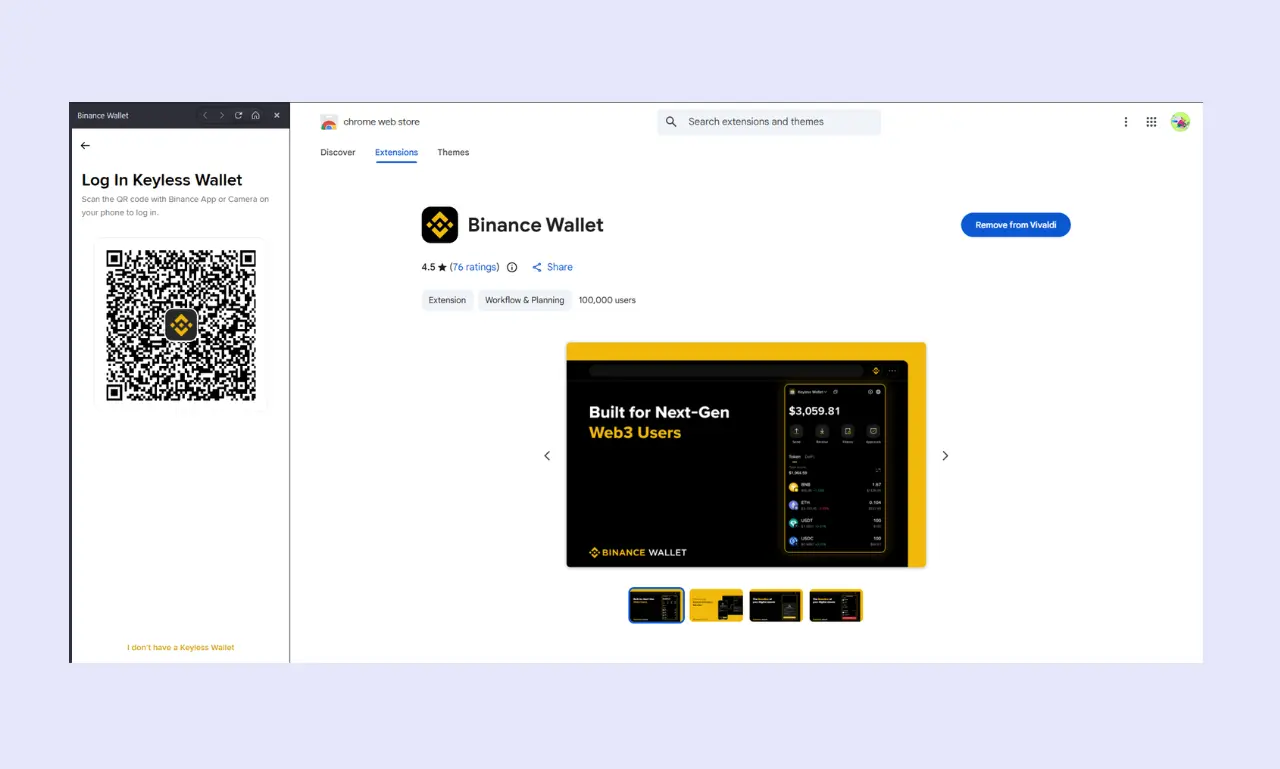
Step 1: Download the wallet - Install the browser extension from the Chrome Web Store or Firefox Add-ons, or get the Binance app on your phone.
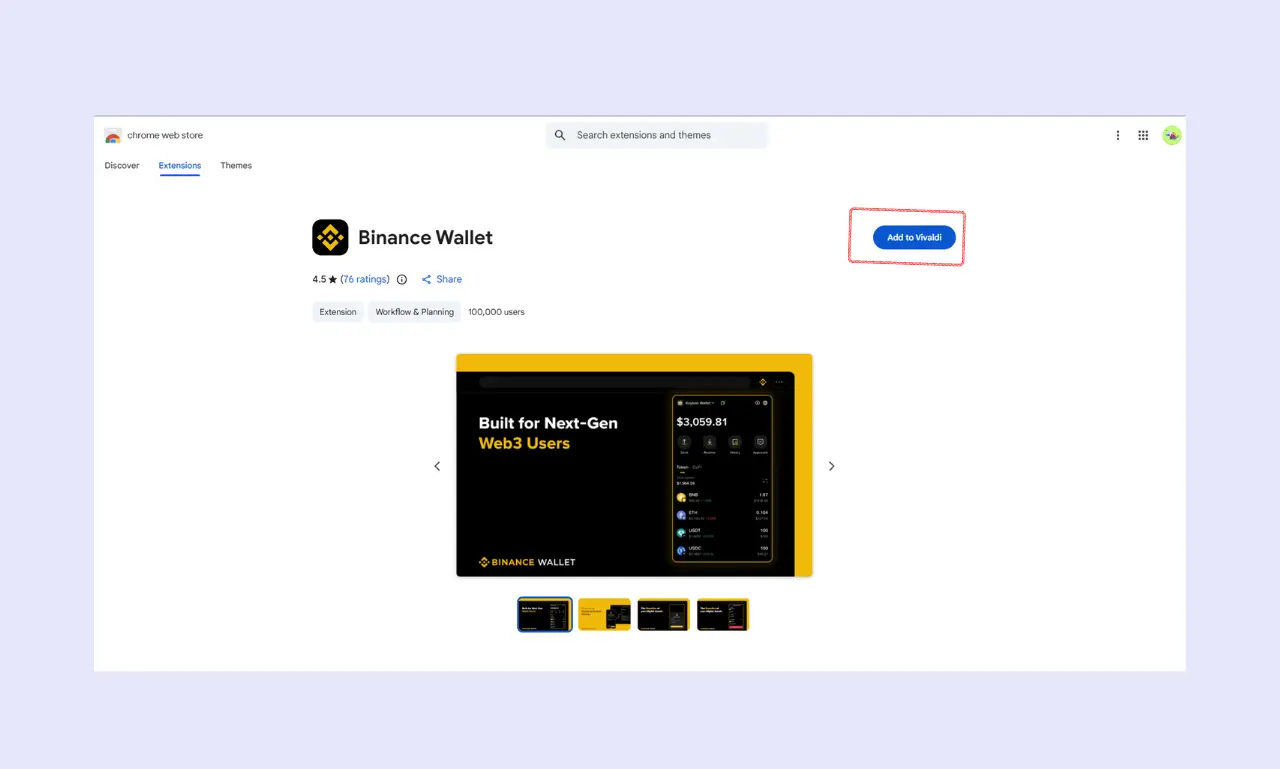
Step 2: Create a new wallet - Open the extension or app and select the option to create a new keyless wallet. Set a strong password.
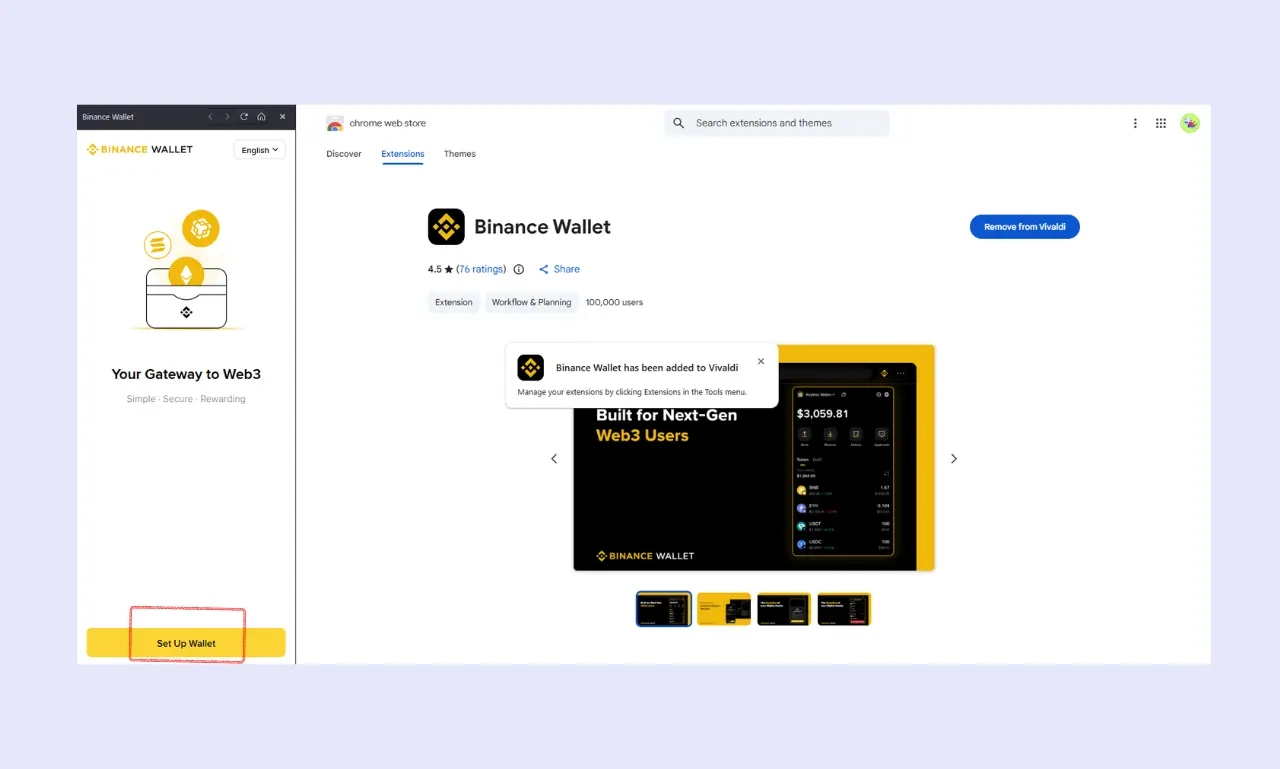
Step 3: Scan the QR code - Log in to an existing Binance account or create a new Binance account.
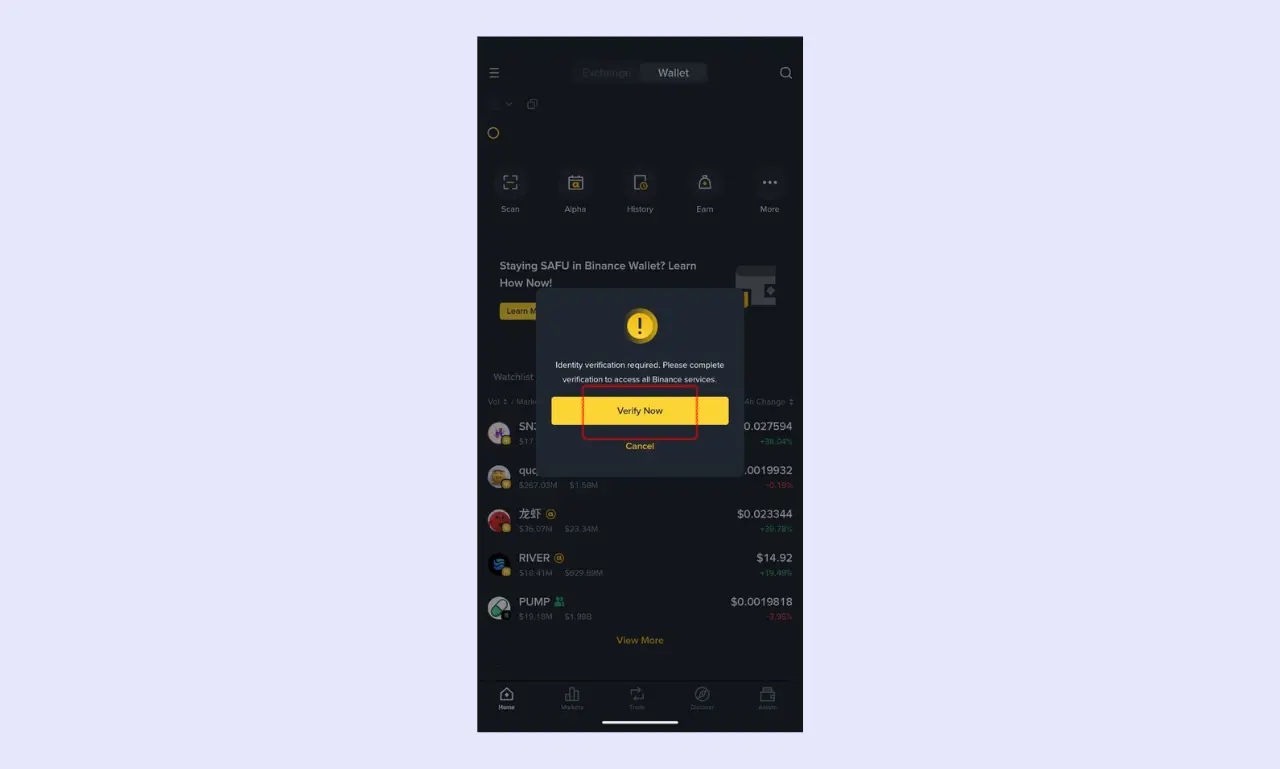
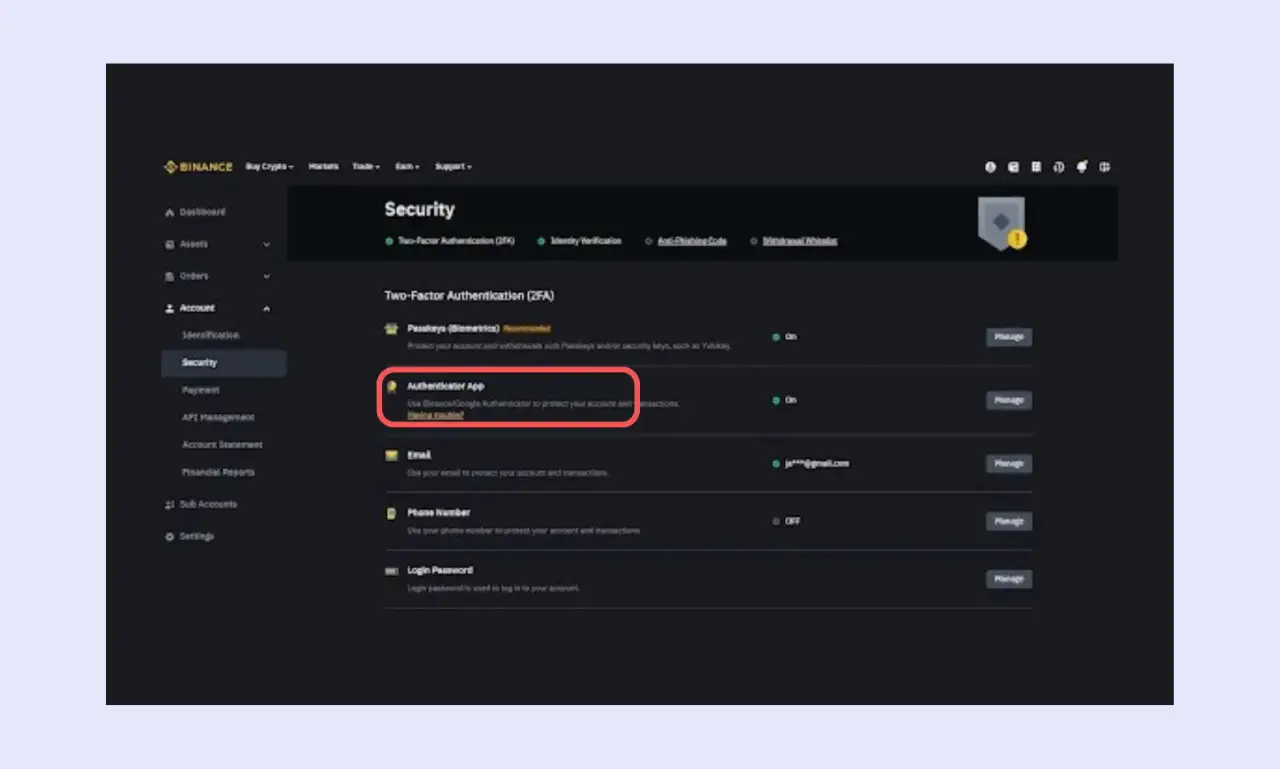
Step 4: Verify Your Account - You have to verify your account to use Binance Wallet.
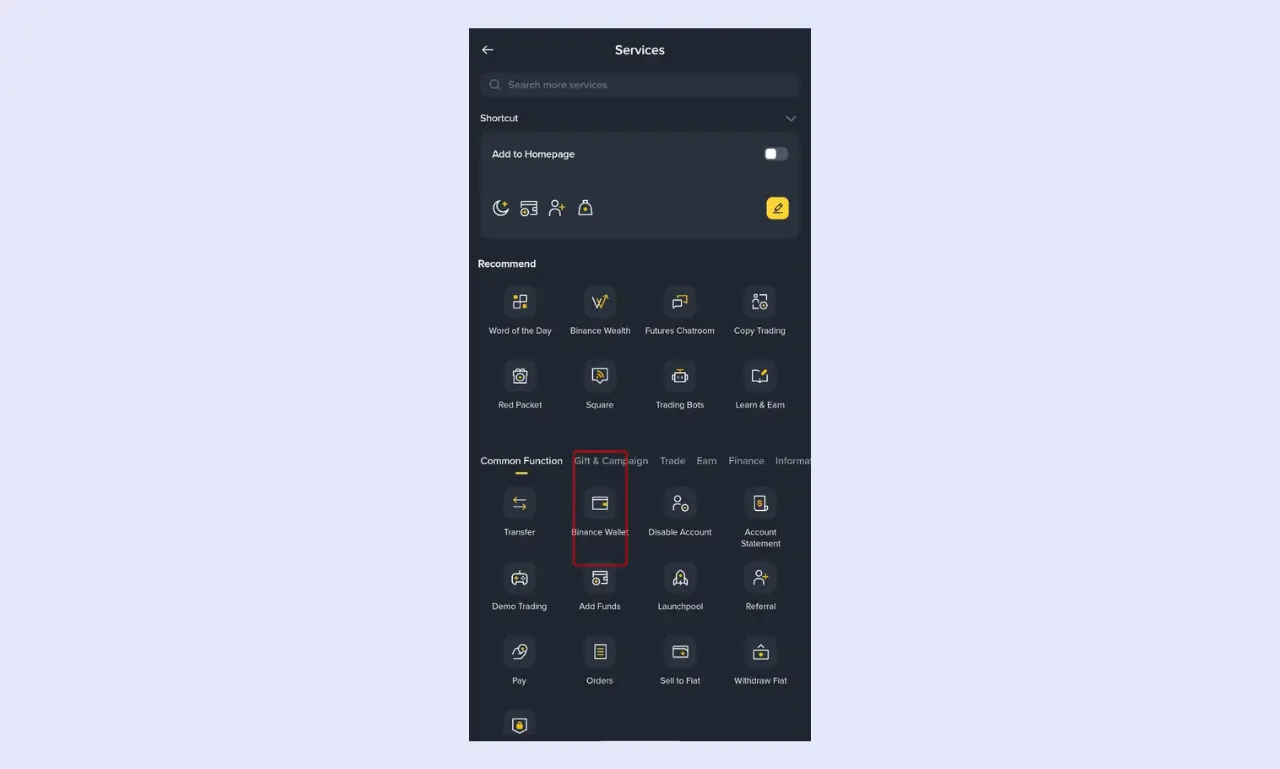
Step 5: Register for your Keyless Wallet - Scroll over to 'overview' and choose 'Binance Wallet.' The Keyless Wallet Binance offers does not require seed phrases. This applies to the non-custodial wallet Binance offers.
Step 6: Customize your settings - Enable biometric login on mobile, set your preferred networks, and explore the wallet dashboard.
Binance Wallet vs Other Wallets
If you're looking for the best hot wallet for crypto, here's how Binance Wallet compares to some of the most popular software wallets available in 2026.
| Wallet | Security | Chains | DeFi Support | Open Source | Platform |
|---|---|---|---|---|---|
| Binance Wallet | Keyless wallet, Full self-custody with local key encryption and biometric login; no hardware wallet support | Over 100 supported blockchains | Built-in dApp browser and token swaps with multi-source liquidity | Not fully open-source | Chrome and Firefox extension; Android and iOS through the Binance app |
| Bitget Wallet | MPC wallet that gives you access to both your seed phrase and keys after account creation, backup and biometric options; supports hardware wallet connections | Over 100 supported blockchains | Built-in swap, bridge, and dApp browser with launchpad features | Partially open-source | Chrome extension; standalone Android and iOS app |
| Metamask Wallet | Self-custody with encrypted key storage; integrates with Ledger and Trezor | Ethereum and EVM-compatible chains primarily; additional networks through Snaps | Swaps available natively; broad dApp connectivity across EVM chains | Open-source and community audited | Chrome, Firefox, Edge, and Brave extensions; Android and iOS apps |
| Phantom Wallet | Self-custody with local encryption and biometric login; Ledger support available | Solana, Ethereum, Bitcoin, Polygon, and Base | Built-in swaps and dApp browser focused mainly on the Solana ecosystem | Not fully open-source | Chrome, Firefox, Brave, and Edge extensions; Android and iOS apps |
Final Thoughts
Binance Wallet holds up well as a multi-chain wallet that keeps things simple without cutting corners on functionality. As a non-custodial mobile wallet and browser extension crypto wallet, it gives you full control of your funds while still being easy to navigate day to day.
The built-in swap and dApp tools make it a practical DeFi wallet, and the staking wallet features add extra utility if you want to earn on your holdings. Binance Wallet's security is solid, though the lack of hardware wallet support and full open-source transparency may bother some users.
Overall, this Binance Wallet app review shows that the Binance Wallet crypto wallet is a strong all-in-one option, especially if you're already plugged into the Binance ecosystem.
What & How We Tested (Methodology)
We tested:
- Set up time, import/create wallet
- Security checks (key encryption, PIN, biometrics)
- dApp connectivity (WalletConnect, browser extension)
- Transaction latency and gas fee settings
- Swap experience and price slippage
- Backup & recovery process
- Audit transparency (open-source verification)
For each of these, we tested Binance Wallet on both the browser extension and the mobile app to see how it performs in everyday use. We focused on how smooth and intuitive each process felt, whether anything took longer than expected, and how the experience compared to other wallets we've reviewed.
FAQ
How does Binance Wallet store private keys?
Binance is a Keyless wallet; you don’t need a private key
Is it safe to connect Binance Wallet to dApps?
Connecting to dApps is generally safe as long as you’re careful about which platforms you interact with. Always double-check URLs and permissions before approving any transactions. Binance Wallet shows you what a dApp is requesting before you sign, helping you avoid blindly granting access. Sticking to well-known and verified DeFi protocols is the safest approach.
Does it support NFTs and staking?
Binance Wallet lets you view and manage NFTs on supported networks directly within the wallet. Staking is also available for certain tokens through the Binance ecosystem, though the options depend on which blockchain you’re using. For both features, everything is accessible from inside the wallet, so you don’t need to go to separate platforms to get started.
Is it open source and audited?
Binance Wallet is not fully open-source, so the community can’t independently review all its code. On the audit side, Binance, as a platform, has undergone third-party security reviews, but detailed wallet-specific audit reports are not widely published. If full code transparency is a priority for you, keep this in mind.
What happens if I lose my device or seed phrase?
Your Binance wallet is linked to your Binance account. It is a Keyless wallet, so you don’t need a seed phrase to recover your account.
Are there transaction or swap fees
You’ll pay standard network (gas) fees for any transaction, which vary depending on the blockchain and how busy it is. For token swaps, a small service fee is built into the rate you’re quoted. Binance Wallet doesn’t charge extra fees on regular transfers beyond what the network requires. Before confirming anything, you can always preview the estimated costs so there are no surprises.