CoinTracker Review 2026: Is It Ready for Form 1099-DA?

- When you click links on this page, we may earn an affiliate commission. By using this website you agree to our terms and conditions and privacy policy.
- Participation in online gambling may be illegal in your country and is subject to age restrictions (18, 19, or 21, depending on the jurisdiction). Verify legality and age requirements before participating. Learn more
While reviewing CoinTracker, we discovered that the best thing about this software is its acceptance by top crypto exchanges like Coinbase, Uphold, and Bitstamp, allowing seamless integration into their platform. As one of the best crypto tax software providers, CoinTrack is recognized as a trailblazer in the crypto tax space, making it easy for crypto investors to calculate and pay taxes.
TL;DR
- Core Strength: Deepest Coinbase integration on the market, with reconciliation tools built directly into the Coinbase app and automatic transfer detection across wallets.
- Compliance Status: Full Form 1099-DA support, including direct import, broker-vs-record reconciliation, and discrepancy flagging through its Account Health system.
- Pricing Value: Mid-range to premium. Paid plans start at $59/year, but most active traders need the $199 Prime tier for tax-loss harvesting and unlimited staking.
- Best For: Coinbase-first investors with light to moderate DeFi activity who want clean automation and don't mind paying for it.
What is CoinTracker?

For this CoinTracker review, I'll cover everything you need to know about the platform. It's a crypto portfolio tracker and tax reporting tool founded in 2017 by Chandan Lodha and Jon Lerner, headquartered in San Francisco. Over time, it has grown into one of the most recognized names in the crypto tax space, serving over 2.5 million users and tracking tens of billions of dollars in crypto to date.
The company's core mission centers on simplifying tax compliance for everyday investors and institutions. That mission carries particular weight for CoinTracker 2026, with the IRS rolling out Form 1099-DA for digital asset brokers.
This form standardizes how exchanges like Coinbase report gross proceeds to the tax authorities, but it only captures activity on a single platform. Transfers between wallets or exchanges can leave you with a missing or zero cost basis record, which is where dedicated software becomes useful. CoinTracker positions itself as the bridge between fragmented broker reports and a complete, IRS-ready tax picture.
Reputation-wise, the tool has deep ties to major industry players. Coinbase selected CoinTracker as an official tax partner for the fifth consecutive year, and it also integrates directly with TurboTax and H&R Block for filing handoff. Backing from Accel, General Catalyst, Initialized Capital, Y Combinator, and Coinbase Ventures adds institutional credibility.
Integration coverage is where the tool earns most of its practical value. Here's what CoinTracker currently connects with:
- Over 500 exchanges, wallets, and blockchains supported via API or direct connection
- More than 50,000 smart contracts
- 600+ decentralized applications (dApps) and protocols
- 70+ blockchain networks, including Ethereum, Solana, Polygon, Arbitrum, Optimism, Avalanche, Bitcoin, and others
- CSV upload option for platforms without direct API access
If you use Coinbase, Binance, Kraken, MetaMask, Ledger, or Trezor, syncing should be straightforward. For lesser-known platforms or newer decentralized finance (DeFi) protocols, expect some manual CSV work, which is typical across the crypto-tax category.
Key Features for the 2026 Tax Year
With 2026 introducing new IRS reporting rules and expanded on-chain complexity, I'll break down three areas that matter most: how CoinTracker handles Form 1099-DA reconciliation, its depth of DeFi and NFT tracking, and the tools it offers for fixing data errors.
Form 1099-DA Reconciliation
Form 1099-DA is the IRS's new broker reporting form for digital asset proceeds, and 2026 is the first tax-filing season it actually applies to. If you're a non-exempt US taxpayer who sold, swapped, or redeemed crypto on a US custodial exchange in 2025, you'll get a 1099-DA from that platform.
For the 2025 tax year, exchanges aren't required to report cost basis. So your form might show you sold $10,000 worth of Bitcoin without saying a word about what you originally paid for it. The IRS could look at that and assume the entire amount is taxable gain, which isn't how any of this actually works.
This is the exact problem any reliable crypto tax software 2026 needs to solve, and CoinTracker is built specifically for it. It handles the full 1099-DA lifecycle, from ingestion to reconciliation to final filing, using your full transaction history to fill in what the broker forms leave blank.
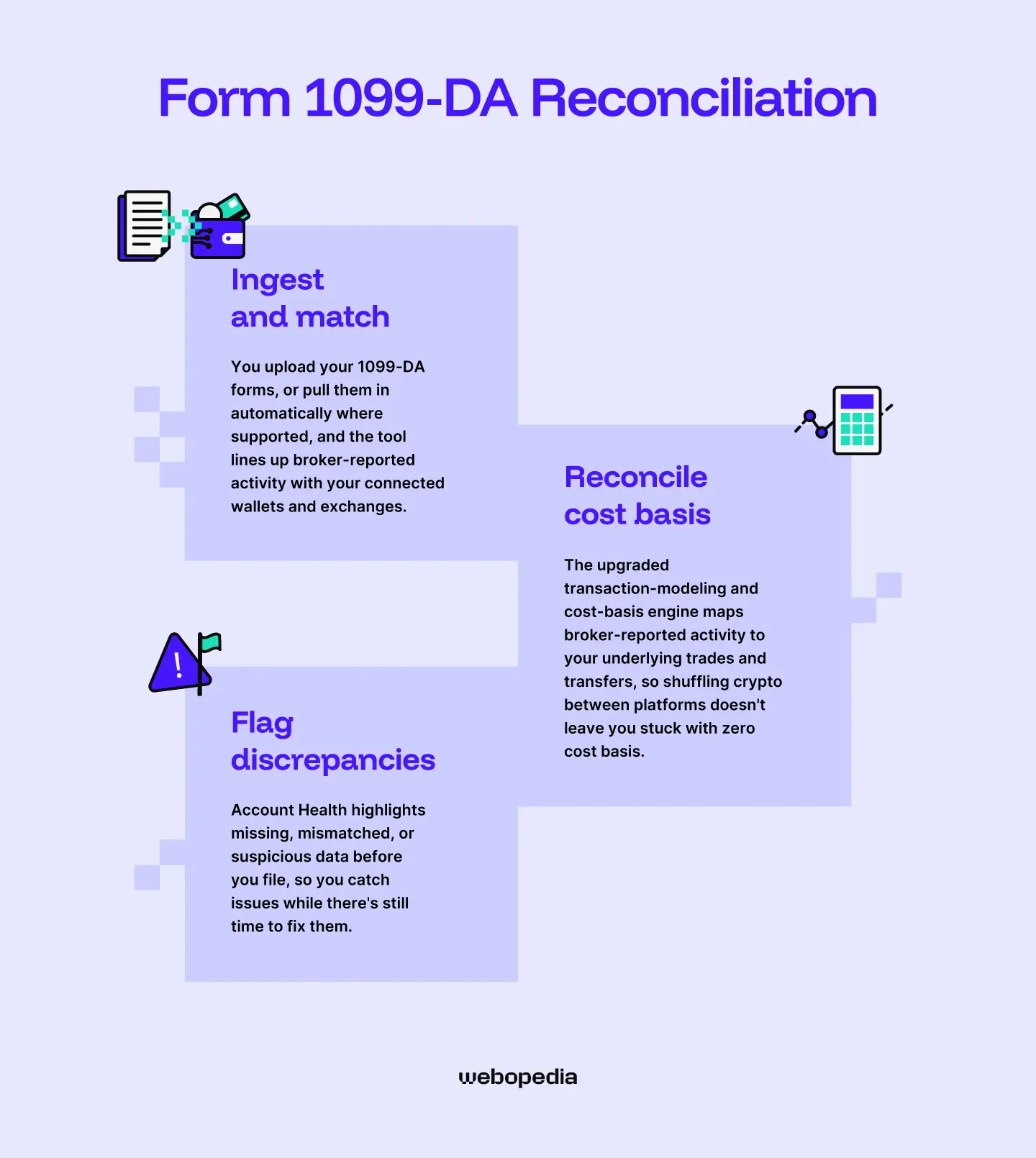
The workflow breaks down into three stages:
- Ingest and match - You upload your 1099-DA forms, or pull them in automatically where supported, and the tool lines up broker-reported activity with your connected wallets and exchanges.
- Reconcile cost basis - The upgraded transaction-modeling and cost-basis engine maps broker-reported activity to your underlying trades and transfers, so shuffling crypto between platforms doesn't leave you stuck with zero cost basis.
- Flag discrepancies - Account Health highlights missing, mismatched, or suspicious data before you file, so you catch issues while there's still time to fix them.
The Coinbase integration deserves a special mention. Coinbase has built CoinTracker's reconciliation tools right into its app, so you can automatically fill in missing cost basis, sync future transfers, and get tax documents ready without jumping between platforms. If you trade on Coinbase and move crypto elsewhere, this takes a lot of tedious matching off your plate.
Transfer vs. Sale example: Say you buy 1 ETH on Coinbase for $2,000, then move it to MetaMask, and six months later you sell it on Uniswap for $3,500. Coinbase issues a 1099-DA showing the transfer out, but it has no idea what you eventually sold it for. Uniswap doesn't send a 1099-DA at all. Without reconciliation, you'd be piecing this together from scratch. CoinTracker follows the ETH across both platforms, recognizes the transfer isn't a taxable event, and calculates your actual $1,500 gain only when the sale happens.
DeFi & NFT Support
DeFi is where crypto taxes get messy fast. A single afternoon of trading on Uniswap, farming on Aave, and minting an NFT on OpenSea can leave you with dozens of transactions the IRS treats differently. CoinTracker covers most of the common activity automatically, though there are still some corners where you'll need to step in manually.
On the DeFi side, the tool handles liquidity pools, staking, lending, and borrowing across major protocols automatically. It now supports liquidity events through dedicated transaction classifications, with auto-classification that tags specific DeFi activity based on the protocol for EVM-based dApps.
In plain language: when you add ETH and USDC to a Uniswap pool and get LP tokens back, the tool recognizes that swap for what it is and doesn't accidentally tag it as a taxable sale. When you later pull your liquidity out, it knows how to close the loop.
Staking gets similar treatment. Whether you're staking ETH through Lido and receiving stETH, or earning SOL rewards on Solana, the rewards show up as income at fair market value on the day you receive them.
That's the correct tax treatment in the US, and it saves you from having to look up historical prices for every single reward.
Where things get dicey is with newer or smaller protocols. If you're trading on a freshly launched decentralized exchange (DEX) or using an obscure yield farm on a smaller chain, the tool might not recognize the contract, and you'll see transactions show up as generic "send" or "receive" events that need manual tagging. This is a pretty common pain point across the category, not unique to CoinTracker.
For NFTs, the platform tracks:
- Mints, including the gas and mint cost, as part of your cost basis
- Purchases and sales on OpenSea, Blur, Magic Eden, and other major marketplaces
- Transfers between your own crypto wallets, which it correctly treats as non-taxable
- Royalties and creator earnings are recognized as ordinary income
Here's my honest take: if you're mostly trading on Coinbase, Binance, or Kraken with some light DeFi and a handful of NFTs, CoinTracker will handle nearly everything on autopilot. If you're deep into experimental protocols or trading on brand-new chains, budget some time for cleanup.
No tool on the market gets this 100% right, but CoinTracker lands on the stronger end of the spectrum for mainstream DeFi and NFT use.
Error Reconciliation Tools
Even the best crypto tax software will hit snags. Maybe an exchange API didn't pull your full trading history, or you sent tokens from a wallet you forgot to connect, or a token's price just isn't showing up in the database. CoinTracker flags these problems instead of silently plugging in zeros and ruining your tax report, and it gives you the tools to fix them.
The main system at work here is called Account Health. It proactively monitors your connected accounts and flags anything that could affect accuracy, like sync issues or balance mismatches, with alerts showing up right on the mobile home screen.
So, if your Binance API quietly stops pulling new trades, you won't discover it in April during a panic filing session. You'll see the alert when it happens.
When the tool spots a problem on a specific transaction, it tags it with a Review Suggested flag. This is CoinTracker's version of the orange flag system that other platforms use.
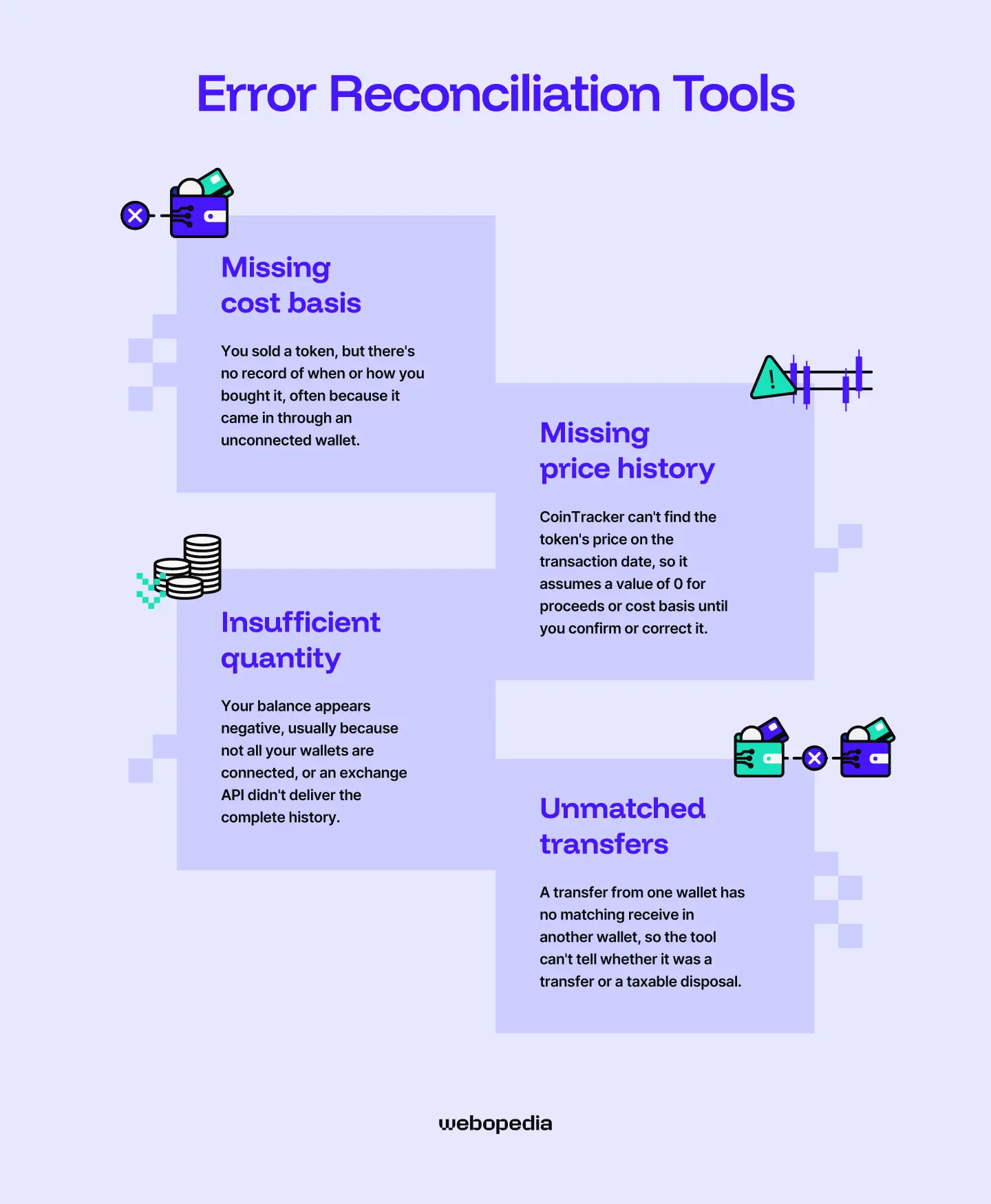
Here's what typically triggers one:
- Missing cost basis - You sold a token, but there's no record of when or how you bought it, often because it came in through an unconnected wallet.
- Missing price history - CoinTracker can't find the token's price on the transaction date, so it assumes a value of 0 for proceeds or cost basis until you confirm or correct it.
- Insufficient quantity - Your balance appears negative, usually because not all your wallets are connected, or an exchange API didn't deliver the complete history.
- Unmatched transfers - A transfer from one wallet has no matching receive on another, so the tool can't tell whether it was a transfer or a taxable disposal.
Fixing these is usually straightforward. For missing price data, you can click Edit on the flagged transaction and enter the token price for that date, or confirm the zero value if you agree with it.
For insufficient quantity errors, the fix is almost always adding the wallet or CSV that's holding the rest of your history. CoinTracker even shows you a filtered view of every prior transaction for that asset, so you can compare against your own records and spot what's missing.
One caveat: if you've been trading heavily in DeFi, you might rack up a lot of flags at first, especially on older or less-standard interactions. Users have reported issues with the incorrect categorization of Uniswap V2 liquidity pool transactions and missing staking transactions on Kraken.
The tool keeps expanding its coverage, but you can expect some manual cleanup on complex portfolios. Plan to spend an hour or two reviewing flags before you finalize your report. That's still a lot less painful than rebuilding your tax basis from scratch in a spreadsheet.
Ease of Use & User Experience
If you have been using software for a while, you will agree that some are easy to use, while others can be a bit complicated. This is usually because of the website design or how cumbersome it can be to get things done. Now I'll dig into how CoinTracker actually feels to use, looking first at how quickly you can get your accounts synced versus uploading a CSV, then comparing the interface against a familiar industry benchmark.
Description
Signing up for CoinTracker takes about a minute: email, password, two-factor authentication (2FA), done. The real onboarding starts when you connect your first wallet or exchange, and this is where the time investment varies a lot depending on your portfolio.
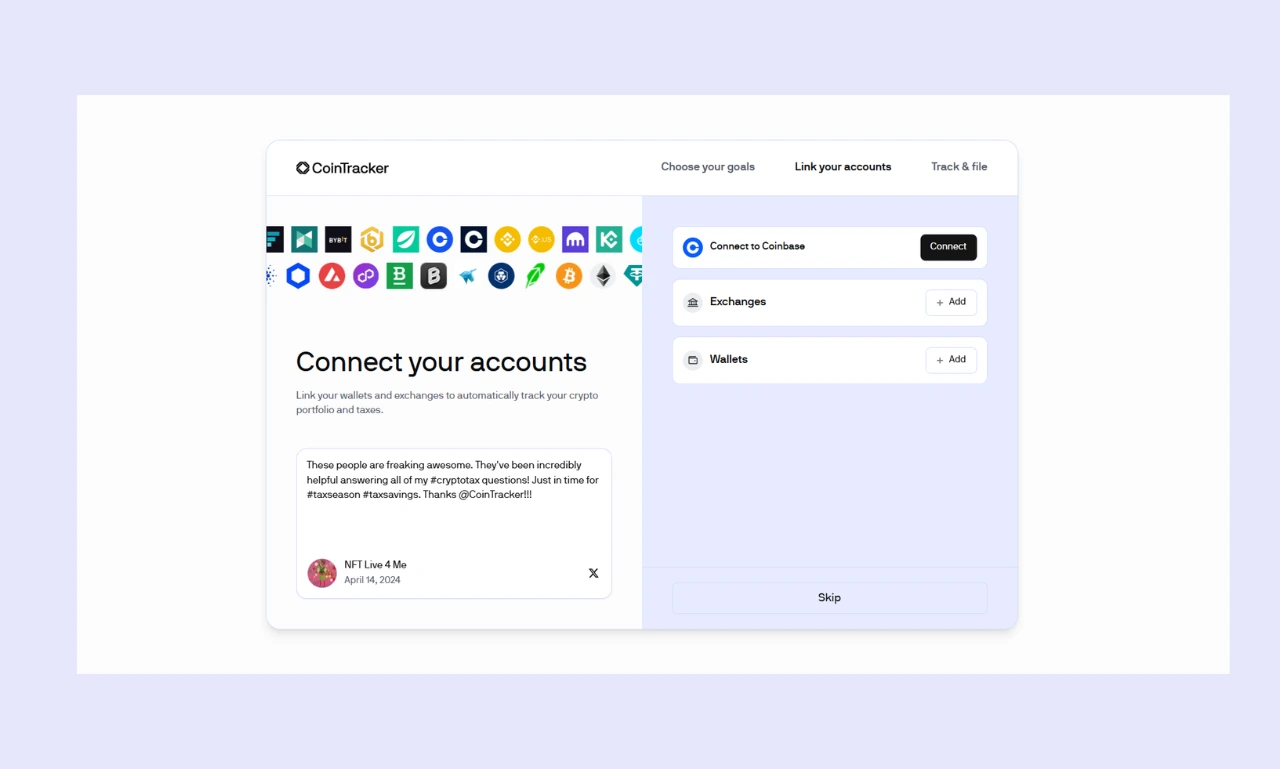
For exchange syncs, you've got two paths. The fast one is a read-only API connection. You log into Coinbase, Binance, Kraken, or whichever platform, generate a read-only API key, paste it into CoinTracker, and the tool does the rest.
Keep in mind that some exchanges require activating the key via 2FA or email confirmation and may revoke or restrict old API keys. And some can require you to set specific permissions (Query, Query Ledger Entries, Export Data, etcetera) and may not sync fully if permissions are too broad or too narrow.
Smaller wallets and exchanges with simpler histories often sync in roughly five minutes, while larger accounts with tens of thousands of transactions and a more complex history can take around 30 minutes to over an hour. Most casual investors fall into the first bucket and are looking at their full Coinbase history within minutes.
Wallet syncing is similarly quick. For self-custody wallets like MetaMask, Phantom, or Rabby, you just paste in your public address. The blockchain does the heavy lifting, so within the same five-to-thirty-minute window, your on-chain activity populates. Hardware wallets like Ledger and Trezor work the same way: paste the public address, no signing required.
CSV uploads are slower and more hands-on. Use these when:
- The exchange has shut down or doesn't offer API access
- You're importing from a platform CoinTracker doesn't natively support
- An API connection is missing some historical data, and you need to fill the gap
The catch with CSVs is formatting. If your original file isn't compatible, you'll need to download CoinTracker's CSV template and reformat the data with specific columns for date, currency, sent quantity, received quantity, and fees.
Plan on about 15-30 minutes per file if you're comfortable with spreadsheets, longer if it's your first time. Heads up: CoinTracker doesn't run a duplication check on CSV imports, so if the integration already pulled some transactions, importing the CSV will create duplicates you'll have to clean up manually.
In practice, expect somewhere between 15 minutes for a single Coinbase user and a couple of hours for someone with multiple exchanges, several wallets, and a mix of CSVs to upload. After the initial setup, syncing happens automatically in the background, so you only revisit it when you add a new account.
Comparison
If you've ever used Mint or Personal Capital (now Empower) for tracking your traditional finances, CoinTracker's interface will feel immediately familiar. The dashboard takes the same approach: a clean portfolio overview at the top showing total value and 24-hour change, holdings broken down by asset below that, and tabs along the side for transactions, wallets, taxes, and settings. There's almost no learning curve if you've spent any time in a personal finance app.
The visual design leans modern and minimal. White space is generous, fonts are easy on the eyes, and color coding stays consistent. Green for gains, red for losses, orange for transactions that need your attention. Charts are interactive, so you can hover to see exact values or drag to zoom into specific date ranges, similar to what you'd see in Robinhood or Coinbase's own portfolio view.
Mobile is where CoinTracker pulls ahead of some rivals. The iOS and Android apps mirror the web experience closely, and unlike a few competitors that treat mobile as an afterthought, you can actually do meaningful work from your phone. Reviewing flagged transactions, syncing wallets, checking your tax summary, etcetera, all of it works on a small screen.
A few things to know going in:
- Navigation is shallow. Most features are reachable in two clicks, which keeps things simple but means power users sometimes have to dig into Settings for things like cost basis method or tax-loss harvesting tools.
- Filters are solid. The Transactions page lets you filter by date, wallet, asset, or transaction type, which becomes essential once you've got thousands of entries.
- Help is contextual. Tooltips and inline explanations appear next to confusing fields, especially those related to tax categorization.
Looking at CoinTracker vs Koinly on polish alone, the two are close, with Koinly having a similarly modern feel. CoinTracker edges ahead on the mobile experience and the Coinbase integration. Koinly arguably wins on raw DeFi protocol coverage.
If you've used either Mint, Empower, or Koinly before, you'll be productive in CoinTracker within about an hour. Newcomers to finance dashboards in general might want to spend a bit more time exploring before tackling tax season.
Pricing & Plans
CoinTracker pricing follows an annual subscription model rather than a one-time lifetime purchase. In 2024, the platform moved to annual subscriptions that include both tax reporting and portfolio tracking, with pricing tied to the number of cryptocurrency transactions completed in the previous calendar year.
Subscriptions auto-renew on the original purchase date, but you can cancel anytime, and there's a 100% money-back guarantee within 30 days as long as you haven't downloaded any tax forms.
This is a meaningful distinction worth mentioning upfront. Unlike, for example, CoinLedger, which charges per tax year (you pay each year you want a report), CoinTracker bundles ongoing portfolio tracking with your subscription, so you get year-round value rather than just a tax-season tool.
That said, this isn't a one-and-done purchase either. If you want next year's tax forms, you’ll need to stay subscribed or renew for that year.
Here's how the 2026 plans break down:
| Plan | Annual Price | Transaction Limit | Best For |
|---|---|---|---|
| Free (a capped, very limited trial) | $0 | Up to 25, portfolio tracking only (no tax forms) | Trying out the platform |
| Base/Base+ | Two variants: Base (~$29–59) and Base+ ($99), with different limits | Up to 100 | Casual hodlers with light activity |
| Prime/Prime+ | Starting at $199 for Prime and $299 for Prime+ | Up to 1,000 | Active traders who want tax-loss harvesting |
| Ultra | Starting at $599 | Up to 10,000 | Heavy DeFi users and frequent traders |
| Ultra+ | Starting at $1,999 | Up to 250,000 | Power users and high-volume portfolios |
| Full Service | Starting at $3499 | Highest | Hands-off filers who want personal help managing and importing transactions and preparing tax reports |
Prices shown are approximate annual starting points as of October 2026; some tiers have Base+/Prime+/Ultra+ variants with higher prices and limits.
A few things worth knowing before you pick a tier:
- The free plan is really a demo. You can connect wallets and watch your portfolio, but you can't download tax forms, which is the main reason most people sign up.
- Tax-loss harvesting is locked behind Prime. If you want the tool to flag losses you can sell to offset gains, you're paying at least $199.
- Staking rules differ by plan. The Base plan excludes the first $25 USD worth of staking transactions from your limit, while Prime and Ultra plans include unlimited staking. If you stake regularly, jumping to Prime usually pays for itself in headache avoidance.
- Plan timing matters. If you buy before your region's tax extension deadline, you get access to the prior year's tax forms; if you buy after, you'll get the current year's forms instead. So purchase before April 15 if you're filing for the previous year.
- Payment options. You can pay with a card or stablecoins. Stablecoin payments don't get a discount, but they're convenient if you're already in the ecosystem.
One quirk worth noting is that transaction limits are based on your prior calendar year activity. If you forget to add a wallet and later sync more transactions, you might get bumped up to a higher tier and pay the difference. It's best to sync everything before you pay to avoid surprise upgrades.
Pros and Cons of Using CoinTracker
Pros
- Six straight years as Coinbase's official tax partner means deeper data sync and 1099-DA reconciliation built directly into the Coinbase app (for Coinbase users).
- Move crypto between your wallets, and the tool recognizes it as a transfer, not a sale, so you don't get phantom taxable events cluttering your report.
- Proactive alerts for sync failures, missing cost basis, and balance mismatches mean you fix issues throughout the year instead of scrambling in April.
- The iOS and Android apps allow you to review flagged transactions, sync wallets, and check your tax summary on the go
- Email and chat support are available across paid tiers, with priority response times for Ultra and Ultra+ subscribers.
Cons
- Going from Base to Prime is a $100+ jump, and active DeFi users almost always need at least Prime for unlimited staking and tax-loss harvesting.
- Niche protocols, newer chains, and complex liquidity pool transactions often need manual cleanup. Users have reported issues with Uniswap V2 LP classification and missing Kraken staking entries.
- You can track your portfolio for free, but downloading any tax form requires a paid subscription.
- If you upload a CSV that overlaps with an existing API sync, you'll get duplicate transactions and have to clean them up by hand.
CoinTracker vs. Competitors
The crypto tax category has plenty of capable players, but a CoinTracker alternative isn't always interchangeable with the original. Here's how the platform stacks up against its closest rivals across the three areas covered above.
| Feature | CoinTracker | Summ | Token Tax | CoinLedger | Koinly |
|---|---|---|---|---|---|
| 109-DA Reconciliation | Full support with Coinbase integration and Account Health flagging | Strong; cross-references 1099-DA against transaction history | Available via CPA-assisted review on higher-tier plans | Strong; built-in error reconciliation flags missing basis | Supported, with FIFO/LIFO/HIFO cost-basis methods |
| DeFi & NFT Support | Solid for major protocols, gaps on niche chains | Best-in-class for complex on-chain activity, 3,500+ DeFi integrations | Available on Premium tier and above | Good DeFi coverage, hundreds of dApps supported | 1,000+ integrations, but some users report mislabeling |
| Error Reconciliation | Account Health system flags issues proactively | AI-assisted categorization for spam and non-taxable events | Hands-on CPA-assisted review at premium prices | Strongest in the category, alerts for missing data before filing | Double-entry style ledger, but slower to catch subtle errors |
- CoinTracker leads in Coinbase integration and overall polish; Summ wins in DeFi depth; CoinLedger wins in error reconciliation and pricing; Koinly wins in international support; and TokenTax wins if you want a human to handle everything. Pick based on where your activity actually happens.
Key Takeaways
- CoinTracker is best for users who prioritize Coinbase integration and hands-off automation.
- It successfully addresses the 2026 1099-DA requirements by matching broker reports against your full transaction history, then flagging anything missing or mismatched before you file.
- Investors with 100 to 1,000 transactions per year will find the most value in the Prime plan ($199/year).
Frequently Asked Questions
Is there a free version?
There is, but it’s limited. The free plan allows you to connect wallets, track your portfolio in real time, and see your holdings, but it won’t generate or download tax forms. Think of it as a demo to test the interface before committing to a paid tier. If you actually need to file taxes, you’ll need at least the Base plan, which starts at $59 per year for up to 100 transactions.
Can I use this for international taxes?
CoinTracker supports tax reporting in several major jurisdictions outside the US, including the UK, Canada, Australia, Germany, France, India, and South Africa. It generates country-specific reports based on local tax rules, and you can switch your jurisdiction in the settings. That said, US support is the deepest, especially around Form 1099-DA. International users may still need a local accountant for nuanced filings.
Can I sync my hardware wallet (Ledger/Trezor) directly?
Yes, and it’s straightforward. Hardware wallets like Ledger and Trezor sync through your public address rather than requiring a physical connection or signing. You copy the public key from the wallet’s companion app, paste it into CoinTracker, and the platform pulls your on-chain history within minutes. Your private keys never leave the device, so there’s no security tradeoff for getting your transactions tracked automatically.
Will the IRS see my on-chain (DeFi) activity if I use this software?
CoinTracker doesn’t share your raw transaction data with the IRS. It’s a tax preparation tool, not a reporting service. However, blockchains are public, so on-chain activity is already visible to anyone, including tax authorities using chain analysis tools. Using CoinTracker actually helps you stay compliant by accurately reporting DeFi activity yourself, which is a much better outcome than the IRS finding it before you do.