- Coupon Code vs. Promo Code vs. Discount Code vs. Voucher Code
- What a Coupon Code Looks Like
- How Coupon Codes Work
- Types of Coupon Codes
- How to Use a Coupon Code
- Why Your Coupon Code Isn’t Working
- Where to Find Coupon Codes
- Are Coupon Sites and Browser Extensions Safe?
- Why Merchants Offer Coupon Codes
- How Businesses Create Coupon Codes
- The Bottom Line on Coupon Codes

A coupon code is a short string of letters and numbers you enter at an online checkout to get a discount. Depending on the code, it can take a percentage or a fixed amount off your order, remove shipping fees, or add a free item. The store checks the code against its rules before applying the discount.
A typical example is SAVE20, which might take 20% off your order. Coupon codes are also called promo codes, discount codes, or voucher codes. For shoppers, the terms mean the same thing. Some retailers use “promo code” for short campaigns tied to a specific sale.
Coupon Code vs. Promo Code vs. Discount Code vs. Voucher Code
Search for any of these terms, and you’ll find stores using them interchangeably. The differences are mostly about context and region, not how the code works at checkout.
| Term | Where You’ll See It | What It Usually Means |
|---|---|---|
| Coupon code | US retailers, coupon sites | The general term for any code that reduces the price at checkout |
| Promo code | Apps, subscriptions, travel, food delivery | A code tied to a specific promotion or marketing campaign, often short-lived |
| Discount code | Shopify and other e-commerce platforms | The term most store software uses for the code a merchant creates |
| Voucher code | UK, Ireland, and Australia | The same thing as a coupon code; “voucher” is the more common word outside the US |
| Offer code | Apple, subscription services, retailers | A code that unlocks a specific offer, such as a free trial or a set discount |
What a Coupon Code Looks Like
Most coupon codes are short enough to type in a few seconds, and they fall into one of three formats:
- Word-based codes: Easy-to-remember codes such as WELCOME10, FREESHIP, or SPRING25. Merchants use these for public promotions they want people to share.
- Mixed letters and numbers: Codes like JUNE15OFF or VIP2X that combine a campaign name with the offer amount.
- Randomized strings: Codes like K7XQ-92PD-L4MZ that are generated in bulk and issued to one customer each. These are hard to guess, which stops them from spreading on coupon sites.
The format often tells you who the code is for. A word-based code is usually public. A random string sent to your inbox is usually tied to your account or email address and may only work once.
How Coupon Codes Work
When you apply a coupon code, the store’s checkout system looks it up and runs a series of checks before it changes the price. A code only works if your order meets all the rules attached to it.
Those rules usually include:
- Active dates: The code has a start date and an expiry date. Outside that window, it returns an error.
- Eligibility: Some codes are limited to new customers, members of a loyalty program, or the specific email address the code was sent to.
- Minimum spend: Many codes require an order total above a threshold, such as $50, before the discount applies.
- Product scope: A code may cover only certain brands, categories, or full-price items, and may exclude sale items or gift cards.
- Usage limits: Merchants can cap the total number of times a code is used or the number per customer. A code can stop working before its expiry date once that cap is hit.
- Stacking rules: Most stores allow one coupon code per order, though some allow combining codes with sale prices or loyalty rewards.
If all checks pass, the discount appears in your shopping cart or order summary before you pay.
Types of Coupon Codes
Merchants use different labels for the same mechanisms, but almost every coupon code falls into one of the types below.
Percentage-Off Codes
A percentage-off code, such as 15% off, takes a share of your order total. The savings grow as your cart grows, so these codes are better value on larger orders. Many merchants cap the maximum discount, for example, “20% off, up to $50.”
Fixed-Amount Codes
A fixed-amount code takes a set sum off, such as 10off. These work best on smaller orders.If you have a choice between “10 off” and “15% off,” the fixed amount is better on any order under about $67, and the percentage is better above it.
Free Shipping Codes
Free shipping codes waive delivery charges, usually for orders above a minimum order value. They matter more than they might seem. The Baymard Institute found that extra costs such as shipping, taxes, and fees are the most common reason shoppers abandon a checkout.
Buy One Get One (BOGO) and Free Gift Codes
BOGO codes give you a second item free or discounted when you buy the first. Free gift codes add a product, often a sample or accessory, once your order qualifies. Both only save money if you wanted the extra item anyway.
Tiered Codes
Tiered codes increase the discount as you spend more, such as $10 off $75 or $25 off $150. Merchants use them to raise the average order value. Before adding items to reach the next tier, check that the extra spend is worth the extra discount.
Single-Use and Public Codes
A single-use code is unique to a single customer and expires after one order. Public codes, by contrast, can be used by anyone who has them. Stores send single-use codes in welcome emails, abandoned-cart reminders, and customer service apologies, and publish public codes in ads and on social media.
Welcome, Referral, and Loyalty Codes
Welcome codes reward a first purchase or a newsletter sign-up. Referral codes offer a discount to new customers and usually provide a credit to the person who referred them once the first order is placed. Loyalty codes go to existing customers based on their spending or membership tier.
How to Use a Coupon Code
Applying a coupon code takes less than a minute on most sites:
- Add items to your cart: Fill your cart first, since many codes depend on the order total or specific products.
- Find the code field: Look for a box labeled “promo code,” “discount code,” “coupon,” or “gift card or discount code” in the cart or on the payment page. Some sites hide it behind a link you need to click to expand.
- Enter the code exactly: Type or paste it without spaces before or after. Some codes are case-sensitive, so match the capitals.
- Apply it and check the total: Click “Apply” and confirm that the discount appears as its own line before you pay.
- Complete the purchase: Once your payment goes through the store’s merchant account, the discount usually can’t be added, so make sure it’s showing before you place the order.
In apps, the code field is usually on the final checkout screen. For subscriptions, codes are often entered at sign-up and may only apply to the first billing period.
Why Your Coupon Code Isn’t Working
If a code is rejected, the cause is almost always one of the rules attached to it. Check these in order:
- It has expired: Codes found on third-party sites are often out of date. Check the expiry date where you found it, or look for a newer code from the store itself.
- Your order doesn’t meet the minimum: The cart total may be below the threshold, sometimes because the minimum is calculated before tax and shipping.
- Some items are excluded: Sale items, certain brands, and gift cards are common exclusions. Remove them and try again to see if the code applies to the rest.
- It’s tied to another account: Welcome codes only work for new customers, and personal codes only work with the email they were sent to. Log in with that account.
- It has hit its usage limit: Limited-quantity codes stop working once enough people have used them, even before they expire.
- You’ve already applied a discount: Most stores allow one code per order. A sale price or automatic discount may also block a code from applying.
- It’s for another country or channel: A code may only work in one country, only in the app, or only in physical stores.
- It was typed incorrectly: Extra spaces, a zero instead of the letter O, or the wrong case can all cause a rejection.
If none of these apply, contact the store’s customer service team. Many retailers will honor a valid code manually or offer an alternative.
Where to Find Coupon Codes
The most reliable codes come from the merchant itself. Codes shared elsewhere are more likely to be expired, restricted, or fake.
- The store’s website and app: Check the homepage banner and the store’s own promotions or deals page. App-only offers are increasingly common.
- Email newsletters and loyalty programs: Merchants often reward email newsletter subscribers with a welcome code and send members exclusive codes later on.
- Abandoned carts: Some stores send a code by email if you leave items in your cart while logged in. This isn’t guaranteed, but it’s common.
- Social media: Brands post time-limited codes on their own Instagram, X, TikTok, and Facebook accounts.
- Creators and publishers: Influencers, bloggers, and review sites often share codes through an affiliate program, earning a commission when you use them.
- Coupon aggregator sites: Sites that collect codes for many stores in one place. The best ones show when each code was last tested, but expect some to be out of date.
- Browser extensions: Tools that test codes automatically at checkout. See the next section before installing one.
Are Coupon Sites and Browser Extensions Safe?
Most coupon sites and extensions are legitimate, but they are businesses that make money from your purchases. Knowing how they work helps you decide which to trust.
Coupon sites and extensions usually earn an affiliate commission from the store when you make a purchase after clicking their link or using their tool. That commission is tracked with a cookie stored in your browser. The Federal Trade Commission expects US affiliates to clearly disclose this relationship.
Browser extensions have drawn the most scrutiny. In December 2024, a YouTube investigation accused PayPal’s Honey extension of replacing other creators’ affiliate cookies at checkout and of showing shoppers codes that merchants had approved rather than the best available deals. Class-action lawsuits followed, and PayPal has disputed the allegations. In March 2025, Google tightened its Chrome Web Store rules so that extensions may only apply affiliate links, codes, or cookies when the user takes an action and gets a real benefit, such as a working discount.
To stay safe:
- Check the permissions: An extension that can “read and change all your data on all websites” sees everything you browse. Only install one from a developer you trust.
- Be wary of codes that need personal details: A real coupon code never requires your password, card details, or a survey before you can see it.
- Ignore codes that look too good: Offers like “90% off everything” on unofficial sites are usually fake or bait for spam.
- Compare against the store’s own offers: An extension may not find the best code available, so check the merchant’s newsletter or deals page too.
Why Merchants Offer Coupon Codes
For a merchant, a coupon code is a marketing tool that can be measured precisely. Each code can be tied to one campaign, channel, or partner, so the store knows exactly which email, influencer, or ad drove each sale.
Merchants use coupon codes to:
- Win first-time customers: A welcome discount lowers the risk of buying from an unfamiliar store.
- Recover abandoned carts: The Baymard Institute puts the average cart abandonment rate at around 70%. A reminder email with a discount can bring some of those shoppers back.
- Reward loyalty: Codes for repeat customers and members encourage another purchase without discounting prices for everyone.
- Clear stock: Product-specific codes can move seasonal or slow-selling items without cutting the listed price.
- Track partners: Affiliates and creators each get their own code, which shows which partnerships produce sales and determines who earns a commission.
How Businesses Create Coupon Codes
Most e-commerce platforms, including Shopify, WooCommerce, and BigCommerce, have built-in tools for creating discount codes. The setup follows the same steps on almost every platform:
- Choose the discount type: Percentage off, fixed amount, free shipping, or buy X get Y.
- Set the conditions: Add a minimum spend, eligible products or collections, and which customers can use the code.
- Set the limits: Choose start and end dates, a total usage cap, and a one-use-per-customer rule if needed.
- Decide on stacking: Choose whether the code can combine with other discounts or automatic offers.
- Pick public or unique codes: Use one memorable code for a broad campaign, or generate unique codes in bulk for email lists and partners.
Public codes often end up on coupon sites within days, which can cut into margins on full-price sales. Unique, single-use codes and short expiry windows are the usual way to keep a discount with the customers it was meant for.
The Bottom Line on Coupon Codes
A coupon code is a discount you unlock at checkout, and every code comes with rules about when, where, and what it applies to. Before you search for one, check the store’s own website, app, and newsletter, since those codes are the most likely to work.
If a code fails, look at the expiry date, minimum spend, and excluded items before giving up. And if you use a coupon site or extension, remember that it earns a commission from your purchase, so compare its codes against the merchant’s own offers.
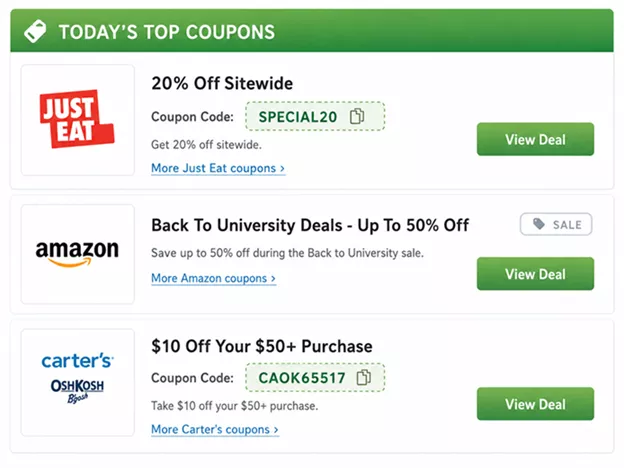
- Example Coupon Discount Codes