How Does a VPN Work?

- When you click links on this page, we may earn an affiliate commission. By using this website you agree to our terms and conditions and privacy policy.
- Participation in online gambling may be illegal in your country and is subject to age restrictions (18, 19, or 21, depending on the jurisdiction). Verify legality and age requirements before participating. Learn more
You connect to the airport’s free Wi-Fi, which means everyone else in the terminal can too. On an open network like this, the person two seats away could potentially see the websites you visit and the data you send. Switch on a VPN, and that changes: your traffic becomes an unreadable stream, and the websites you reach see the VPN’s location instead of yours. This page explains the mechanism behind that change, step by step, including what encryption and protocols do and where the protection stops.
What is a VPN?
A VPN, short for virtual private network, is a service that routes your internet traffic through an encrypted tunnel to a remote server before it reaches the wider internet. That single sentence contains the whole idea: an encrypted tunnel (so outsiders can’t read your traffic) and a remote server (so your traffic appears to come from somewhere other than your device). The rest of this page explains how those two parts work together.
How does a VPN work?
By rerouting your device’s web traffic through a secure VPN server, a VPN acts as an intermediary that encrypts your data, sends it through a protected tunnel, and then forwards it to its final destination. The website or service sends a reply to the server, and the server sends the response back through the tunnel to you. From the outside, two things have changed: your traffic is scrambled, and your real IP address is hidden behind the server’s IP address.
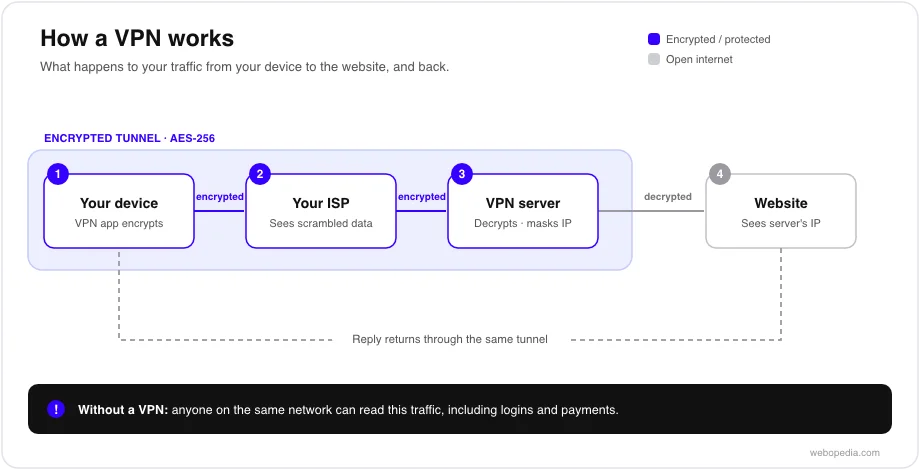
Here’s the journey a single request takes once you’re connected:
- Your VPN app captures the traffic. Before anything leaves your device, the VPN client intercepts your outgoing data.
- It encrypts the data. The traffic is scrambled using encryption (turning readable data into unreadable ciphertext) so that anyone intercepting it sees only noise.
- It travels through the tunnel. The encrypted data passes through your internet service provider to the VPN server. Your provider can see that you’re connected to a VPN, but not what you’re doing.
- The server decrypts and forwards it. The VPN server (also called the exit node, the machine your traffic appears to come from) unscrambles the request and sends it to the destination website under the server’s own IP address.
- The reply returns the same way. The website’s response is sent back to the server, encrypted, routed through the tunnel, and decrypted by your app.
- The result is that the website sees the server’s IP address and location rather than yours, a process called IP masking, and the network between you and the server sees only encrypted traffic.
What VPN encryption actually does
Encryption is what makes the tunnel private, and most reputable VPNs use AES-256, the same standard that secures online banking. AES-256 scrambles your data so that only the intended parties, your device and the VPN server, can read it. Without the key, intercepted traffic is meaningless, which is why a VPN protects you on untrusted networks such as public Wi-Fi.
A useful distinction: encryption protects the contents of your traffic, while IP masking changes its apparent origin. A VPN does both at once, but they’re separate jobs, and it helps to keep them apart when you’re reasoning about what a VPN hides.
VPN protocols: how the tunnel is built
A VPN protocol is the set of rules that decides how the encrypted tunnel is built and maintained, and the one your VPN uses affects speed, stability, and compatibility. You don’t usually need to configure this by hand, but knowing the main options helps you read a provider’s feature list.
| Protocol | What it is | Trade-off |
|---|---|---|
| WireGuard | A newer, lightweight protocol | Fast and efficient; the modern default for most providers |
| OpenVPN | A long-established, open-source protocol | Highly compatible and independently audited; typically slower than WireGuard |
| IKEv2/IPsec | A protocol strong on mobile connections | Reconnects quickly when you switch between Wi-Fi and mobile data |
WireGuard and OpenVPN cover most needs; IKEv2 is valued on phones for handling network changes smoothly. For a fuller breakdown, see our VPN protocol definition.
What keeps the connection from leaking
Two supporting features matter for whether a VPN actually delivers the protection it promises. A kill switch cuts your internet connection if the VPN connection drops, so your traffic doesn’t suddenly leak onto the open network unprotected. A DNS leak occurs when your website lookups bypass the tunnel and reveal what you’re visiting, even though the VPN is on; a well-built VPN routes those lookups through its own servers to prevent it.
The provider’s no-logs policy, a commitment not to record what you do while connected, governs what the VPN itself can see. Because the server decrypts your traffic to forward it, the provider can observe it, so a no-logs policy, ideally one confirmed by an independent audit, is what stops the VPN from becoming the very thing it protects you from. You can read more in our no-logs VPN definition.
What a VPN does not do
A VPN reduces what the network and websites can see, but it does not make you anonymous or secure everything you do online. A few limits follow directly from the mechanism above:
- It doesn’t hide you from sites you log into. Once you sign in to an account, that service knows who you are, regardless of your IP address.
- It doesn’t protect traffic outside the tunnel. If you use split tunneling to exclude an app, that app’s traffic is exposed as normal.
- It isn’t total anonymity. A VPN masks your IP and encrypts your traffic, but your accounts, payments, and the provider’s own systems can still identify you. Treat it as reduced exposure, not invisibility.
- It doesn’t change the law. VPNs are legal to use in most countries but restricted in some, and using one doesn’t make otherwise unlawful activity permissible. Check the rules that apply where you are.
Frequently asked questions
Does a VPN slow down my internet?
Usually a little. Encrypting your traffic and routing it through a remote server adds some overhead, and a distant server adds latency. A modern protocol like WireGuard and a nearby server keep the impact small for most tasks. If speed matters for a specific app, split tunneling lets you route that app outside the VPN.
Is the data inside the tunnel really unreadable?
To anyone intercepting it on the network, yes. Traffic encrypted with AES-256 is unreadable without the key, which is held only by your device and the VPN server. This is why a VPN is effective on untrusted networks such as public Wi-Fi, where interception is the main risk.
Do I need to choose a protocol myself?
Generally no. Most VPN apps select a sensible protocol by default, usually WireGuard, and let you change it in settings if you have a reason to. See our VPN protocol definition for when you might switch.
Next step
Now that you know what’s happening when you connect, the practical move is to set it up correctly: choose a provider with a modern protocol, an audited no-logs policy, and a kill switch, then confirm it’s working. Start with our how to set up a VPN guide, and if you’re weighing providers, our best VPNs comparison tests them against these features. (In-body links here are internal Webopedia pages; paths are placeholders until the VPN hub is published.)


