

dcsimg
Main » Quick Reference »

How to Create a Desktop Shortcut to a Website

This Webopedia guide will show you how to create a desktop shortcut to a website using Firefox, Chrome or Internet Explorer (IE).

Creating a desktop shortcut to a website you frequently visit is useful. It allows you to double-click the icon from your desktop to launch the browser and open the website. The desktop icon will open the website in the browser you used when creating the shortcut.

3 Simple Steps to Create a Shortcut to a Website

The following steps will guide you through the process of creating a desktop shortcut to a website using Firefox, Chrome or Internet Explorer (IE).

1) Resize your Web browser so you can see the browser and your desktop in the same screen.

2) Left click the icon located to the left side of the address bar. This is where you see the full URL to the website.

3) Continue to hold down the mouse button and drag the icon to your desktop. This creates the shortcut.

Create a Desktop Shortcut to a Website

After creating the shortcut you can right-click on the icon and select Rename to edit the text description.
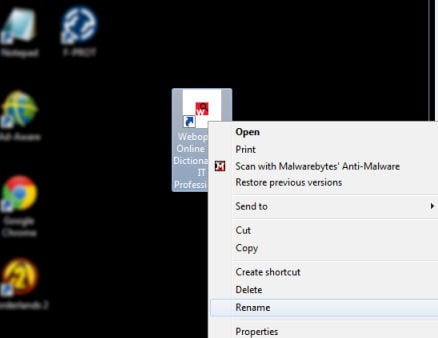

Edit Desktop Shortcut Text


LATEST ARTICLES
Texting & Chat Abbreviations

From A3 to ZZZ this guide lists 1,500 text message and online chat abbreviations to help you translate and understand today's texting lingo. Read More »

List of Well-Known TCP Port Numbers

Port numbers 0 to 1024 are reserved for privileged services and designated as well-known ports. This list of port numbers  are specified in... Read More »

STUDY GUIDES
Computer Architecture Study Guide

Computer architecture provides an introduction to system design basics for most computer science students. Read More »

Network Fundamentals Study Guide

Networking fundamentals teaches the building blocks of modern network design. Learn different types of networks, concepts, architecture and... Read More »

The Five Generations of Computers

Learn about each of the five generations of computers and major technology developments that have led to the computing devices that we use... Read More »