
What is a VPN?
A VPN (virtual private network) is a service that routes your internet traffic through an encrypted tunnel to a server run by the VPN provider, so the network you’re on can’t see what you’re doing, and the sites you visit see the server’s address instead of yours.
That single sentence carries two jobs. The first is privacy from the network you’re connected to: your home internet provider, the cafe Wi-Fi, the hotel router. The second is a change in apparent location, because to the wider internet, your traffic appears to come from the VPN server, not your own device. Everything else a VPN does follows from those two jobs.
How does a VPN work?
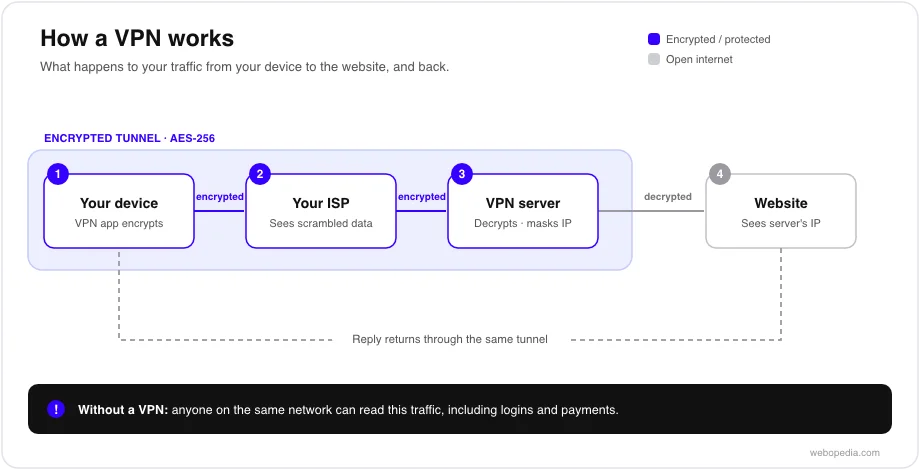
A VPN works by building an encrypted tunnel between an app on your device and a server operated by the provider, then sending all your traffic through it. Three pieces do the work.
The first is encryption, scrambling data so only the intended parties can read it. Reputable VPNs use AES-256, the same encryption standard used to protect sensitive government and banking data. Once your traffic is encrypted, anyone intercepting it on the local network sees unreadable noise rather than the sites and services you’re using.
The second is tunneling, wrapping that encrypted traffic so it can travel across the public internet to the provider’s server without outsiders seeing its contents or destination. The rules governing how the tunnel is built are defined by a VPN protocol [NEW], and the protocol you use affects both speed and reliability.
The third is the server, sometimes called the exit node, the remote machine your traffic appears to come from. When your request reaches the server, it is decrypted there and forwarded to the website. The site replies to the server, which encrypts the response and sends it back down the tunnel to you. Because the site only ever communicates with the server, it sees the server’s IP address rather than your real one. This is IP masking: hiding your real address behind the server’s.
Put together: your device encrypts, the tunnel carries the traffic, and the server stands in for you. The local network sees an encrypted connection to a single server and nothing more; the websites see the server, not you.
Why would you use a VPN?
People use a VPN whenever they want the network they’re on to see less, or to control the location their traffic appears to come from. A few common situations:
- You’re on public Wi-Fi, at an airport, a cafe, or a hotel, and you don’t want others on that network to see your activity. The encrypted tunnel is doing its main job here.
- You don’t want your internet service provider logging every site you visit. Without a VPN, your provider can see the domains you connect to; with one, it sees only an encrypted connection to the VPN server, not the destinations beyond it.
- You’re travelling, and a service you use at home behaves differently when you’re abroad. Connecting via a server back home can restore the experience you’re used to. Check the service’s terms first, as some restrict this.
- You work remotely and need a more secure connection to company systems. Business VPNs are designed to extend a private network to staff working outside the office.
The main VPN protocols
The protocol is the rulebook for the tunnel, and the three you’ll see most often trade off speed, security, and compatibility in different ways.
| Protocol | What it is | Best for |
|---|---|---|
| WireGuard | A newer protocol with a deliberately small codebase, which makes it fast and easier to audit | Speed and modern setups |
| OpenVPN | A mature, widely trusted open-source protocol that’s highly configurable and runs over most networks | Reliability and broad compatibility |
| IKEv2/IPsec | A protocol that reconnects quickly when a connection changes | Mobile devices switching between Wi-Fi and cellular |
There’s no single “best” protocol for everyone. WireGuard tends to be the fastest, OpenVPN has the longest track record and works almost anywhere, and IKEv2 handles the constant network switching on a phone gracefully. Most consumer VPN apps let you choose, and default to a sensible option if you don’t.
What a VPN does not do
A VPN protects the connection between you and the VPN server. It isn’t a cloak of total anonymity, and it’s worth being clear about the limits.
A VPN does not make you anonymous. Your VPN provider can technically see your traffic at the point where it leaves the tunnel, which is why a provider’s no-logs policy [NEW], its commitment not to record what you do while connected, matters, and why independently audited no-logs claims are more credible than unaudited ones.
A VPN does not prevent you from being identified once you log in. By signing in to an account, you’ve identified yourself to that service, VPN or not. Cookies and browser fingerprinting can also track you even when your IP address changes.
A VPN does not protect you from malware or phishing. It encrypts your connection; it doesn’t inspect what you download or warn you off a fake login page. You still need the usual defences for that.
A VPN does not guarantee faster internet speeds. Routing traffic through an extra server usually adds a little overhead, so speeds can dip slightly, though a fast protocol and a local server keep the difference small.
How to choose a VPN
Once you know what a VPN does, choosing one comes down to a handful of checkable features rather than marketing claims. The ones that matter most:
- Audited no-logs policy. The single most important feature is that the provider can see your traffic at the server. Favour a no-logs policy [NEW] confirmed by an independent audit over one that’s only asserted.
- Encryption and protocol. Look for AES-256 (or the modern, fast ChaCha20) paired with WireGuard or OpenVPN. Treat “military-grade encryption” as marketing and check the named standard instead.
- Provider jurisdiction. The country in which a provider is based affects what it can be compelled to share. Providers in intelligence-sharing alliances (often referred to as the 5, 9, and 14 Eyes) may be subject to data-sharing arrangements.
- Server network. More servers, and servers near you, generally mean faster, more reliable connections and less congestion.
- Connection speed. Expect a slight dip compared to your normal connection; modern protocols and a nearby server keep it small enough that you won’t notice it for everyday browsing.
- Simultaneous connections. Check how many devices you can protect at once, since most people use a phone, laptop, and tablet.
- Split tunneling. Lets you route some apps through the VPN and others directly, useful for reaching local devices or recovering speed on specific tasks.
- Data caps and support. Some services, especially free ones, limit your data. Reliable customer support matters when a connection misbehaves.
For a step-by-step walkthrough of weighing these and getting set up, see our guide on how to choose a VPN [NEW].
Frequently asked questions
Are VPNs legal?
In most countries, yes. VPNs are a standard privacy and security tool for individuals and businesses. A handful of countries restrict or regulate their use, so check your local laws if you’re unsure or travelling. Using a VPN doesn’t make otherwise illegal activity legal.
Are VPNs safe to use?
A reputable VPN is safe and, on untrusted networks, makes you safer by encrypting your connection. The provider matters: look for strong encryption (AES-256), a modern protocol, and an independently audited no-logs policy. Free VPNs can be riskier, as some fund themselves by collecting and selling user data.
Does a VPN slow down your connection?
Usually a little. Encrypting your traffic and routing it through an extra server adds some overhead, but with a fast protocol like WireGuard and a server close to you, most people won’t notice it for everyday browsing and streaming.
Is a free VPN as good as a paid one?
Sometimes, but be cautious. Running a VPN costs money, so a free service has to cover that somehow: occasionally through data limits, sometimes through ads, and in the worst cases by logging and selling your activity, which defeats the point. Read the no-logs policy before trusting one.
Next step
If a VPN sounds like the right tool for you, the practical follow-up is choosing one and getting it running. See our guide on how to set up a VPN [NEW] and our explainer on what VPN encryption is [NEW]. For the underlying terms, the kill switch [NEW] and split tunneling entries are good next reads.

